Plan, schedule and control any project.
Build a schedule from an industry template or an AI draft, check it against DCMA and industry benchmarks, forecast the finish and test recovery options, all on your own computer.
.XERPrimavera P6.XMLP6 XML.XMLMicrosoft ProjectDCMA14-point assessment57R-09AACE risk practice
Everything a planning team needs, in one application
For the people who build, review and report schedules: planners, project managers, owners, contractors, consultants and PMOs, in any industry and any size of organisation.
Schedule Builder
Create a schedule from eight industry templates or an AI draft, edit it with undo, or open P6 and Microsoft Project files without a P6 licence.
Templates · XER · P6 XML · MSP XMLPlanning Whiteboard
Brainstorm phases, activities and logic with your team and the AI, review the plan, and turn it into a schedule in one step.
New in 3.1 · stencils · live sharingSchedule Integrity
Identify missing logic, hard constraints, high float, lags and the other quality issues that weaken a schedule.
14 DCMA + 11 extended checksCritical Path Analysis
Identify critical and near-critical activities, trace the driving path to any milestone and rank multiple float paths.
Up to 25 float paths + logic diagramSchedule Risk
Evaluate schedule exposure with Monte Carlo simulation, a risk register and three-point estimates.
P50 / P80 · tornado · criticalitySmart Assistant & AI
One-click fixes, plain-language commands and contextual suggestions; optionally ask what drives the finish and draft the monthly narrative.
Built in · AI opt-in with your own accountTBM Drives
Tunnel boring planned by chainage: advance by ground class, a time–chainage plan and forecast, and the interfaces the face releases.
Mine Production
Turn the development schedule into tonnes: cycle times, stopes and backfill, fleet and hoist limits, and life of mine against targets.
New in 3.8 · MIDS moduleIndustries & Data Protection
Nine industry profiles with their own checks and KPIs, and optional passphrase encryption of everything saved on your computer.
New in 3.8 · 9 sectors · AES-256Four editions, one application
Start with the edition that fits the role. Every edition opens the same files and upgrades with a new licence key, without reinstalling.
Prices in USD, before applicable taxes. Compare editions in detail
From raw schedule data to actionable project intelligence
A 90-second guided tour of one sample update: a process plant expansion with 77 activities, data date 01-Nov-26.
Made for every industry that runs on a schedule
The scheduling engine, analysis and reporting work the same everywhere. Specialist planning comes as industry modules, starting with Mining.
Your schedule stays on your computer
Files are read inside the application on your machine and are not uploaded, which helps Schedulix through IT reviews. AI is off until you turn it on; when it is on, you see what is sent, and companies can route it through their own AI gateway.
Every result traces back to the file
Schedulix recalculates with its own CPM engine and shows how closely it matches the dates in your P6 or Microsoft Project file.
Methods your reviewers recognise
DCMA 14-point assessment, earned value and earned schedule, and schedule risk analysis following AACE recommended practice 57R-09.
Make every project schedule count.
Discover a smarter way to analyze, manage and optimize project schedules.
Four editions for every role in project controls
Viewer for the people who read schedules, Professional for the people who check them, Enterprise for the teams who forecast and defend them, and Migration for moving P6 to the cloud.
What each edition includes
Every edition opens XER, P6 XML and Microsoft Project XML files and runs entirely on the user's computer.
Easy for users, simple for IT
No servers, no database and no activation service. A single application with an offline licence key.
One application file
Runs in current Chrome, Edge, Firefox and Safari on Windows and macOS. Signed desktop installers follow at general availability.
Offline licence keys
Each key is signed and checked on the computer. Nothing calls home, so it works on site networks and in air-gapped offices.
No uploads, no telemetry
Schedules are processed in memory on the user's machine. The AI assistant is off until a user switches it on.
Files your team already uses
Excel tables, Word narratives and data sheets, an HTML client report that prints to PDF, and clean XER files.
Help from people who build schedules
Delivered remotely by experienced planners. Ask for a quote with your demo request.
Schedule health check
A written quality and critical path review of one P6 or Microsoft Project update, with a prioritised list of fixes.
Risk analysis workshop
Summary schedule, facilitated risk interviews with data sheets, simulation and a P50/P80 report for your steering committee.
P6 Cloud clean-up service
We clean your project portfolio before cut-over to P6 Cloud and return verified files with a change log and report.
Detailed functionality for every stage of schedule control
From reading the file to the risk-adjusted forecast in your monthly report: what Schedulix does and how it does it.
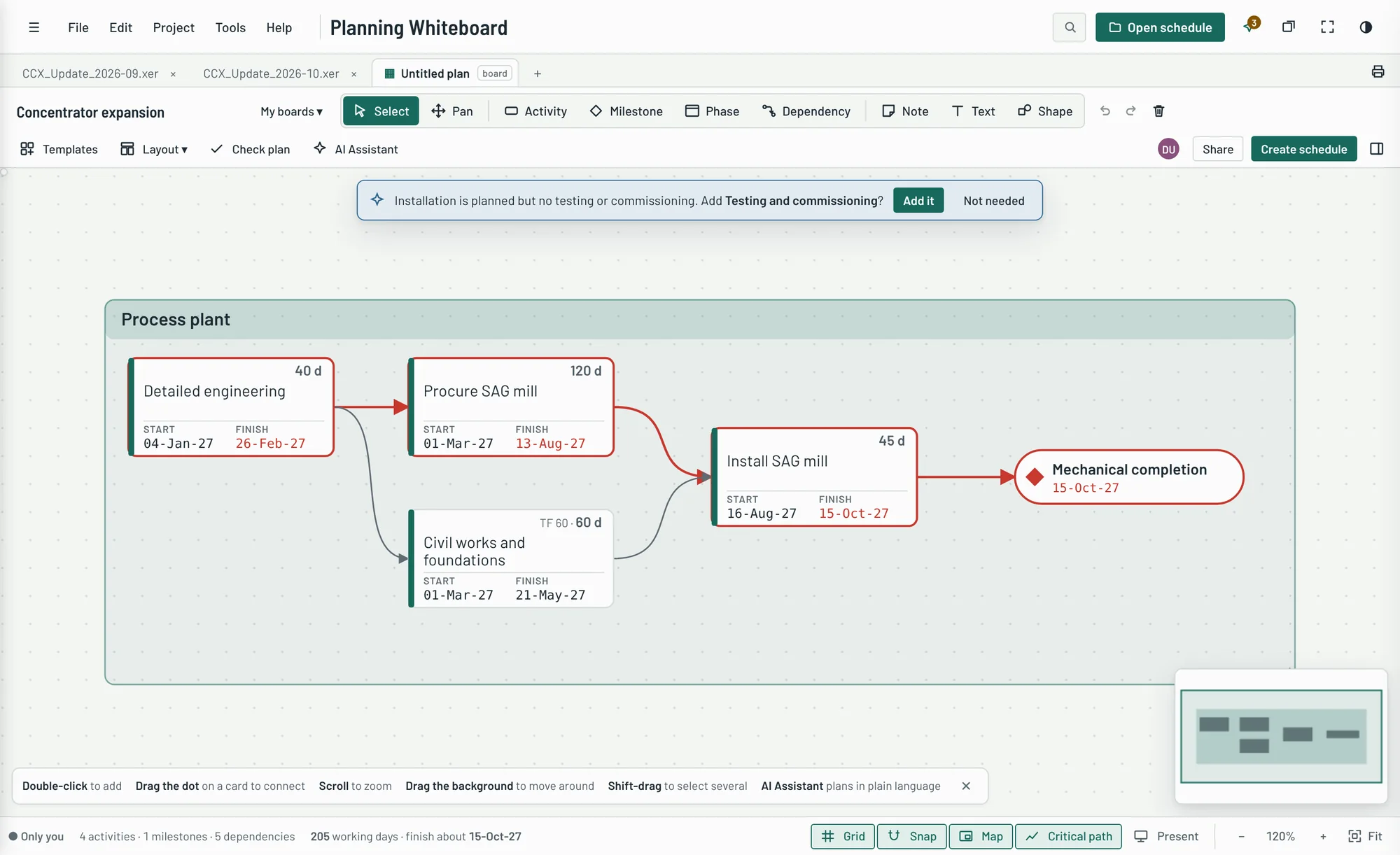
Brainstorm the plan together, then turn it into a schedule
An AI-assisted planning canvas for workshops and early planning. Sketch phases, activities, milestones and dependencies, let the assistant fill the gaps, and create a P6-ready schedule in one step.
- Visual planning: drag cards, draw dependencies from a card's edge, group work into phases that become the WBS, and capture ideas on sticky notes that turn into activities.
- Ask in plain language: “add activity Pour slab after Formwork 3 days”, “identify dependencies”, “estimate durations”, or with the AI Assistant, “generate a plan for a 120 MW solar farm”. Every proposed change is shown before it's applied.
- Review plan: missing work for your industry, open ends and loops, unrealistic durations, outside constraints, and overlaps or accelerations, each tested to show the days saved.
- Specialist stencils for engineering (design stages, long-lead packages, commissioning), construction (permits, floor cycles, handover) and mining (development cycle, level development, ventilation raises, stopes), and repeat across locations for floors, zones and mine levels.
- Both directions: create a new schedule, or push board changes into the open schedule without touching progress, resources or codes; bring an existing schedule onto the board by WBS and date.
- What if? Ask “what if procurement is delayed by 30 days” or “which activities could delay commissioning”: the board recalculates, highlights what moves and suggests recovery, without changing the plan until you apply it.
- Plan together: live sync between windows, a shared board file in OneDrive, SharePoint or a network folder, comments on cards, and saved planning sessions to come back to.
Start a schedule in minutes, in any industry
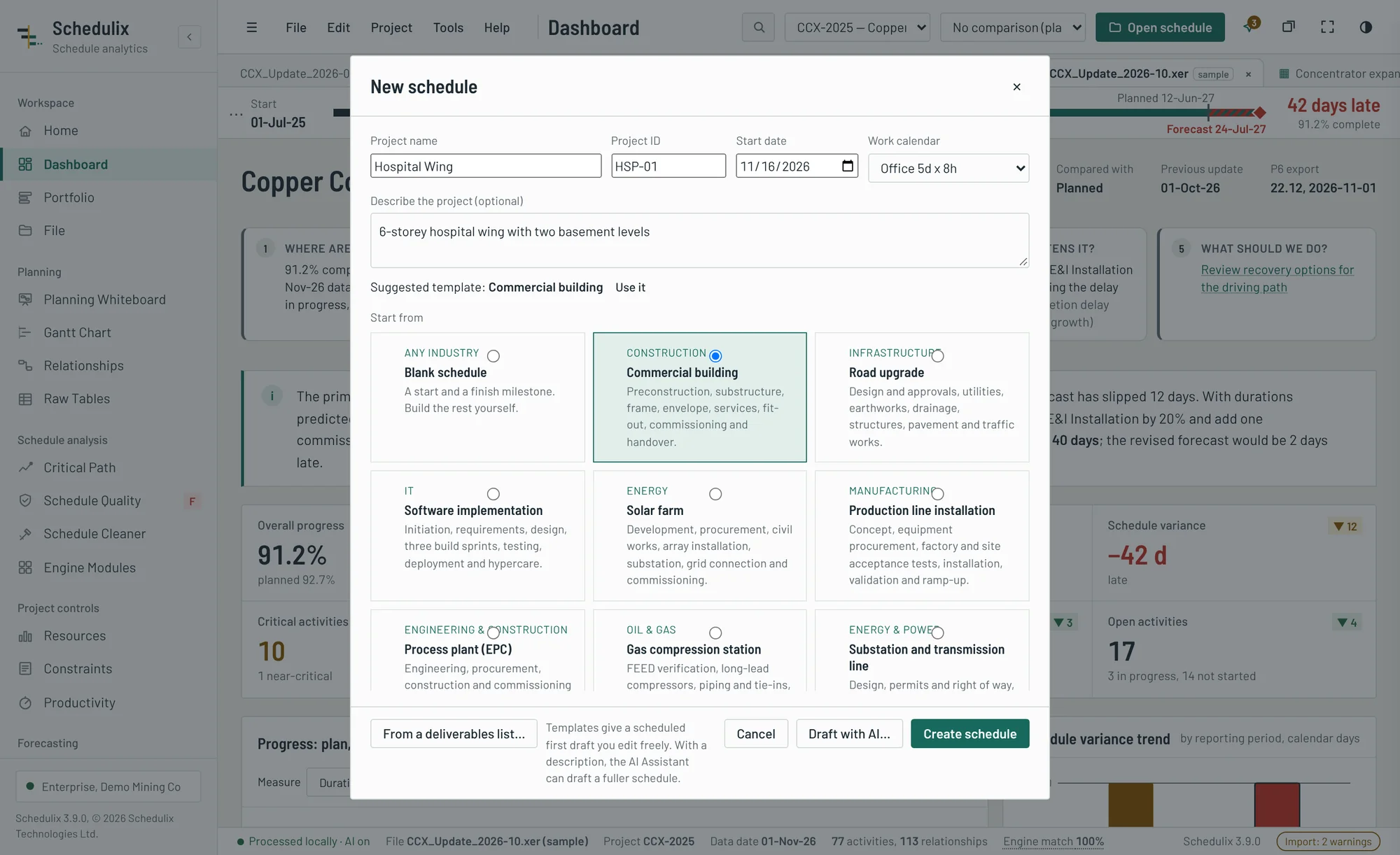
Pick a template or describe the project, and Schedulix builds a scheduled first draft with WBS, durations and logic that you then edit freely.
- Eight templates: blank, commercial building, road upgrade, software implementation, solar farm, production line, process plant (EPC) and underground mine, each with a matching work calendar.
- AI draft (optional): describe the scope and the AI Assistant writes a fuller first schedule with the basis for each duration.
- Edit mode: add activities, milestones and WBS, link with FS, SS, FF or SF and lags, delete with bridging logic, edit inline, undo and redo. Every change is recalculated by the engine.
- Smart help: suggested durations from similar activities, suggested predecessors, and a warning when an edit weakens schedule quality.
- Save as XER or P6 XML to continue in Primavera P6, or keep it in the local library.
Suggestions, one-click fixes and plain-language commands
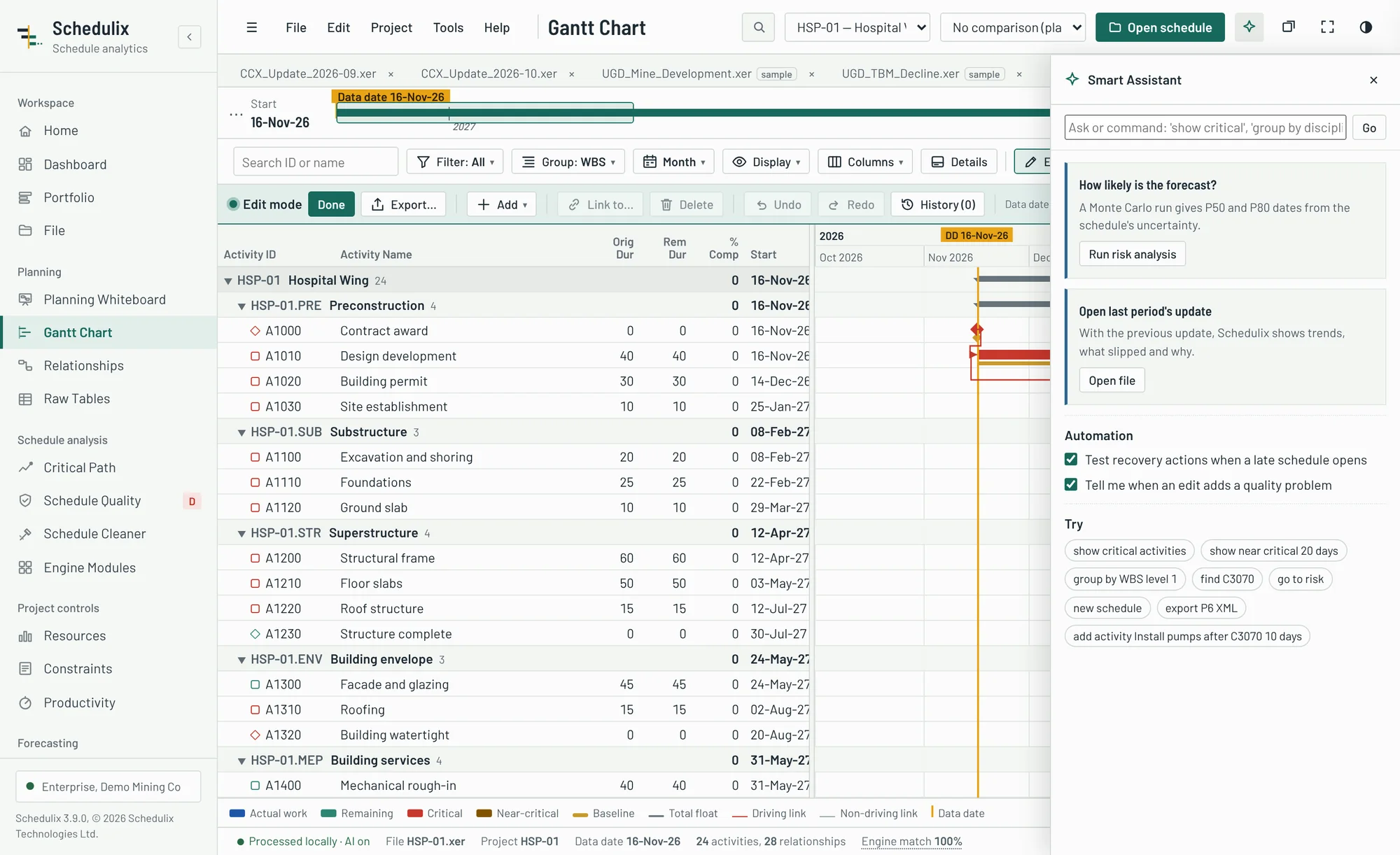
The Smart Assistant watches the view you are in and suggests the next useful step. It works without an AI account.
- One-click fixes with preview: open ends, hard constraints, leads and redundant logic, applied with undo.
- Commands in plain language: “show near critical 20 days”, “group by WBS level 1”, “link A1000 to A1010 SS 2”, “export P6 XML”.
- Automation you control: test recovery actions when a late schedule opens, and warn when an edit adds a quality problem.
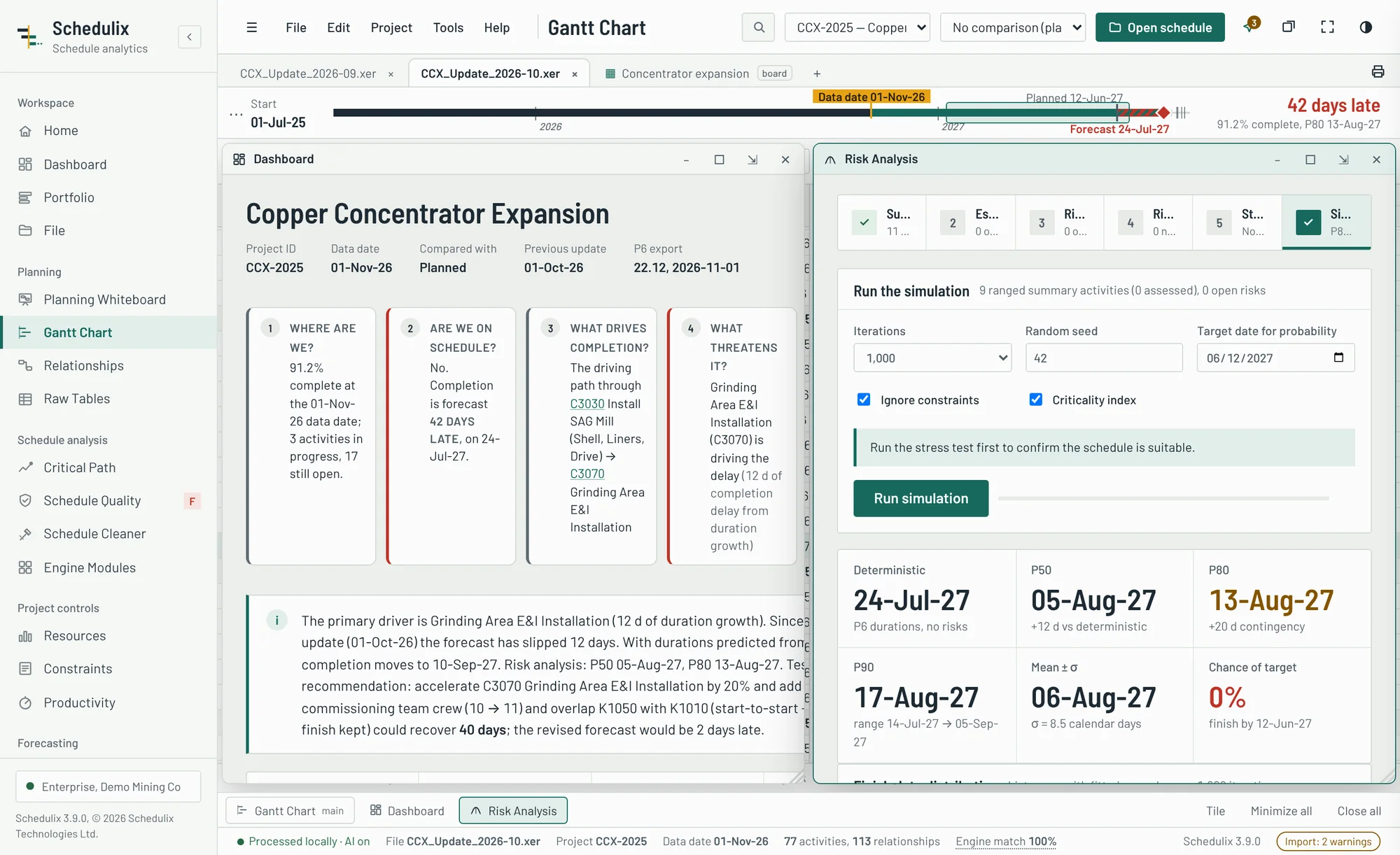
Work the way you think: several views side by side
Open any view in its own window and keep the Gantt Chart, the dashboard and the risk analysis in sight at once.
- Windows you can move, resize, minimise, maximise, restore and tile, with a taskbar to switch between them and Focus mode for a full screen of schedule.
- Essentials or Full menu, pinned favourites, hidden views and workspace profiles for planners, project managers, executives, consultants and mining teams.
- Portfolio: every schedule in your library with forecast, variance, progress and float on one page.
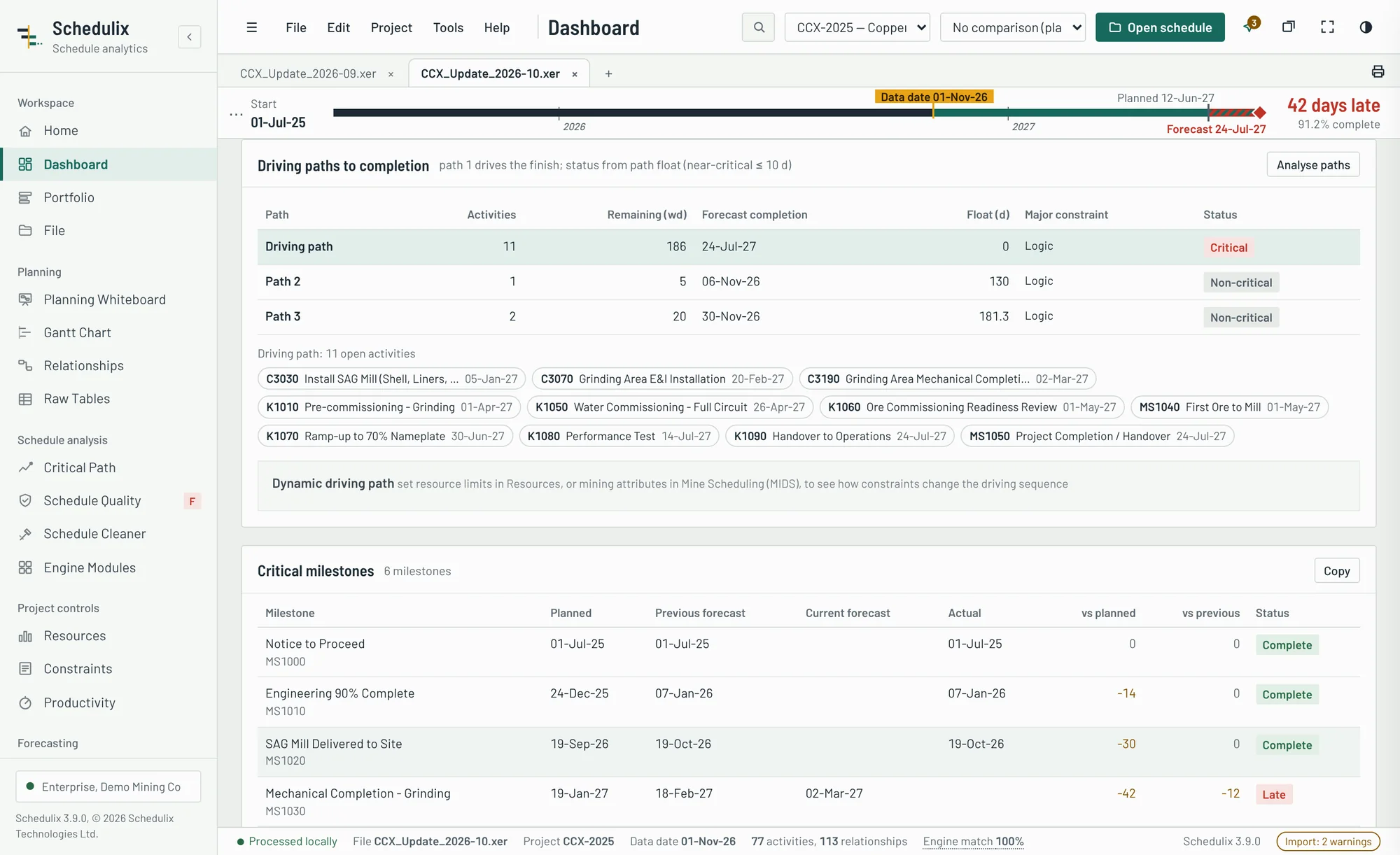
The whole update on one page, organised around decisions
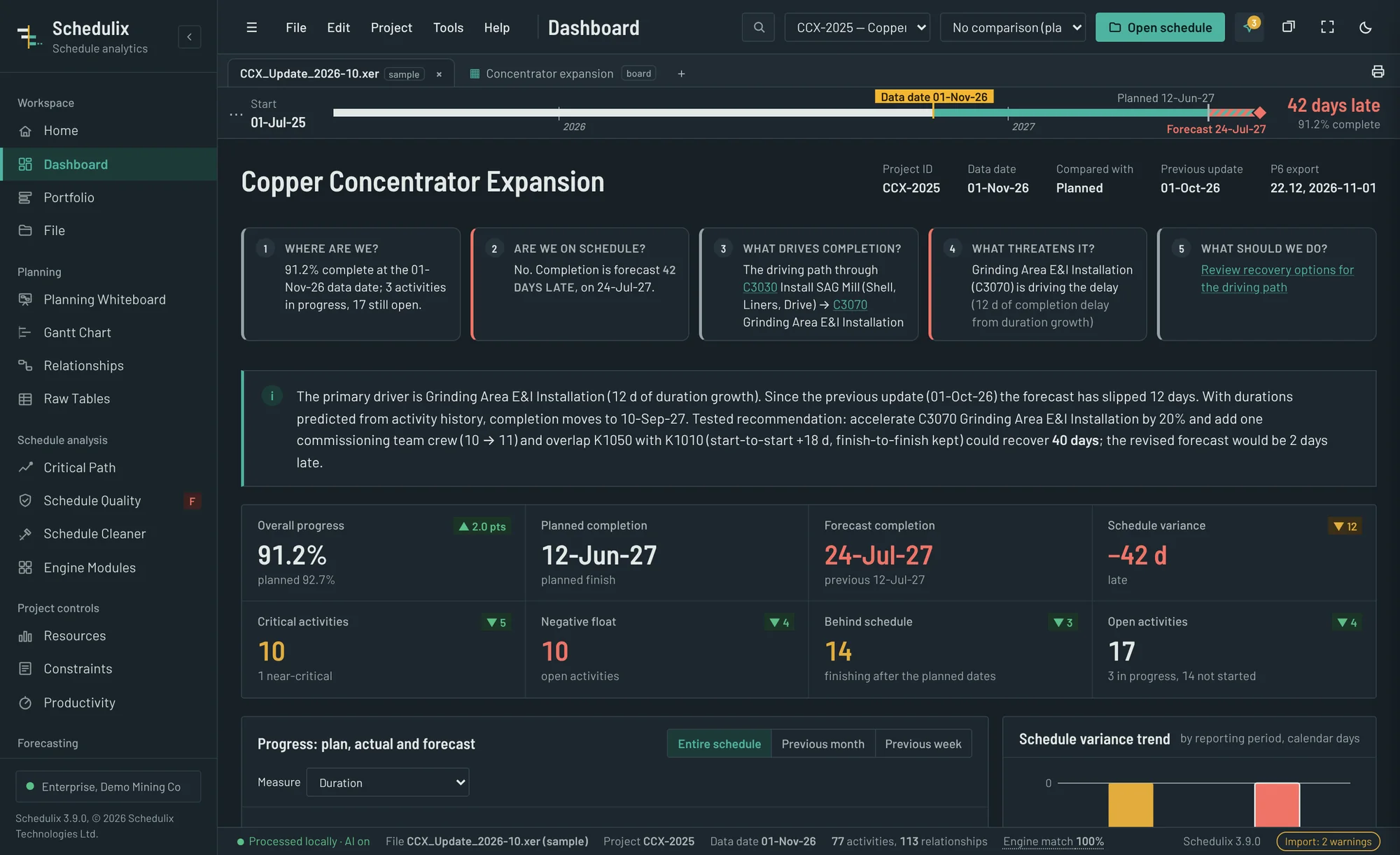
Is the project on time, what drives the finish, what changed since last month and what needs a decision? The dashboard answers each from the schedule data, and every number opens the detail behind it.
- A written headline: the forecast, its primary driver, the change since the previous update and the recovery available.
- Executive KPIs with trends against the previous update. Click critical, negative float, behind schedule or open to see the activities.
- Driving paths with their major constraint, and a dynamic driving path that shows how resource limits or mining systems change the sequence.
- Finish slippage separated from completion impact. The engine shows which delays actually move the project finish, and by how many days.
- Management attention required: each issue with its impact and a recommended action.
- Project history and one comparison selector: every update is kept by data date. Compare against the original baseline, the approved baseline, the previous update or any earlier update.
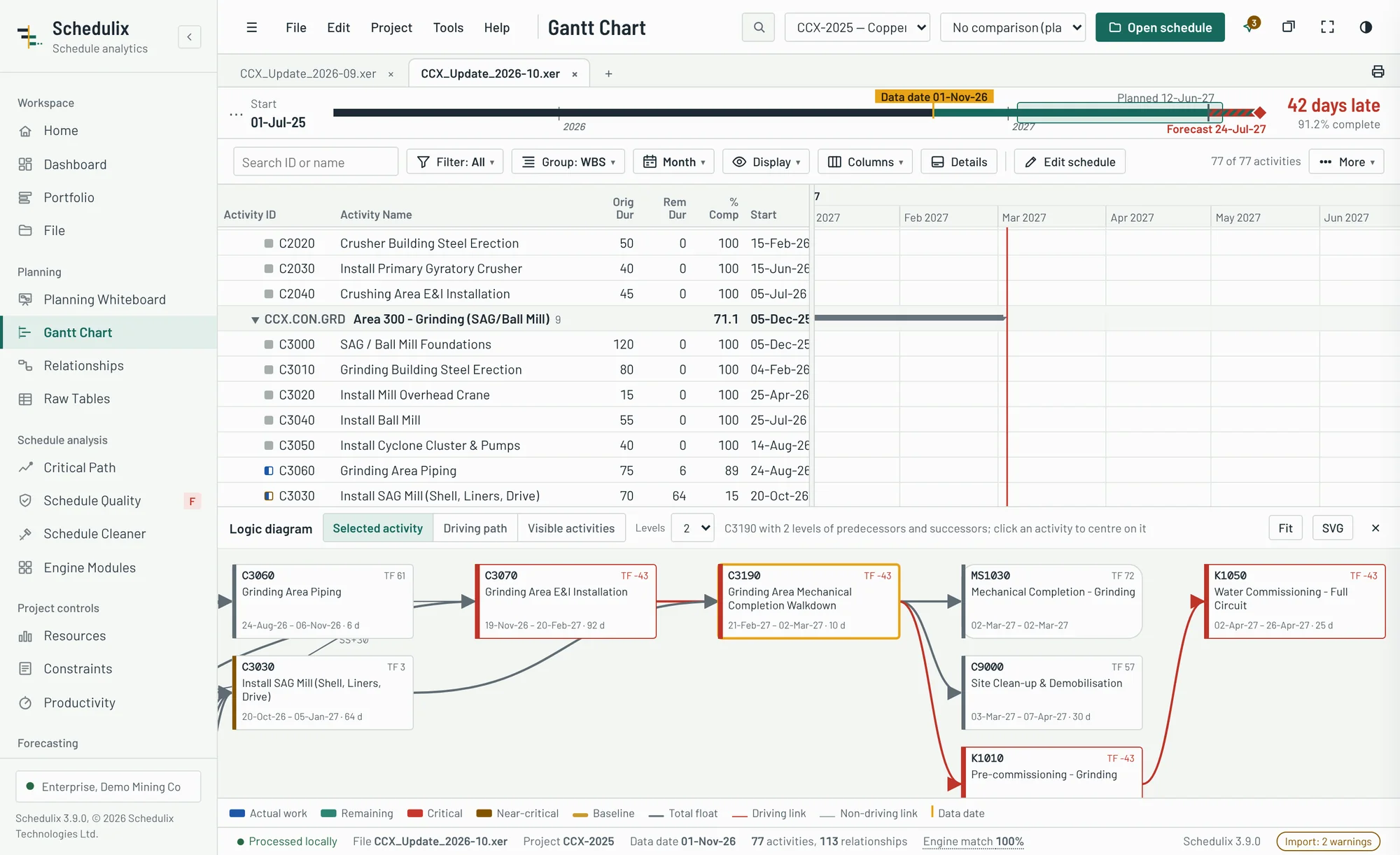
Open any P6 or Microsoft Project schedule in seconds
Drag a file onto the window. Schedulix reads it on your computer and builds the full schedule model, with no P6 licence, database or import wizard.
- Three formats. Primavera P6 XER, P6 XML with baseline projects, and Microsoft Project XML with summary tasks mapped to WBS.
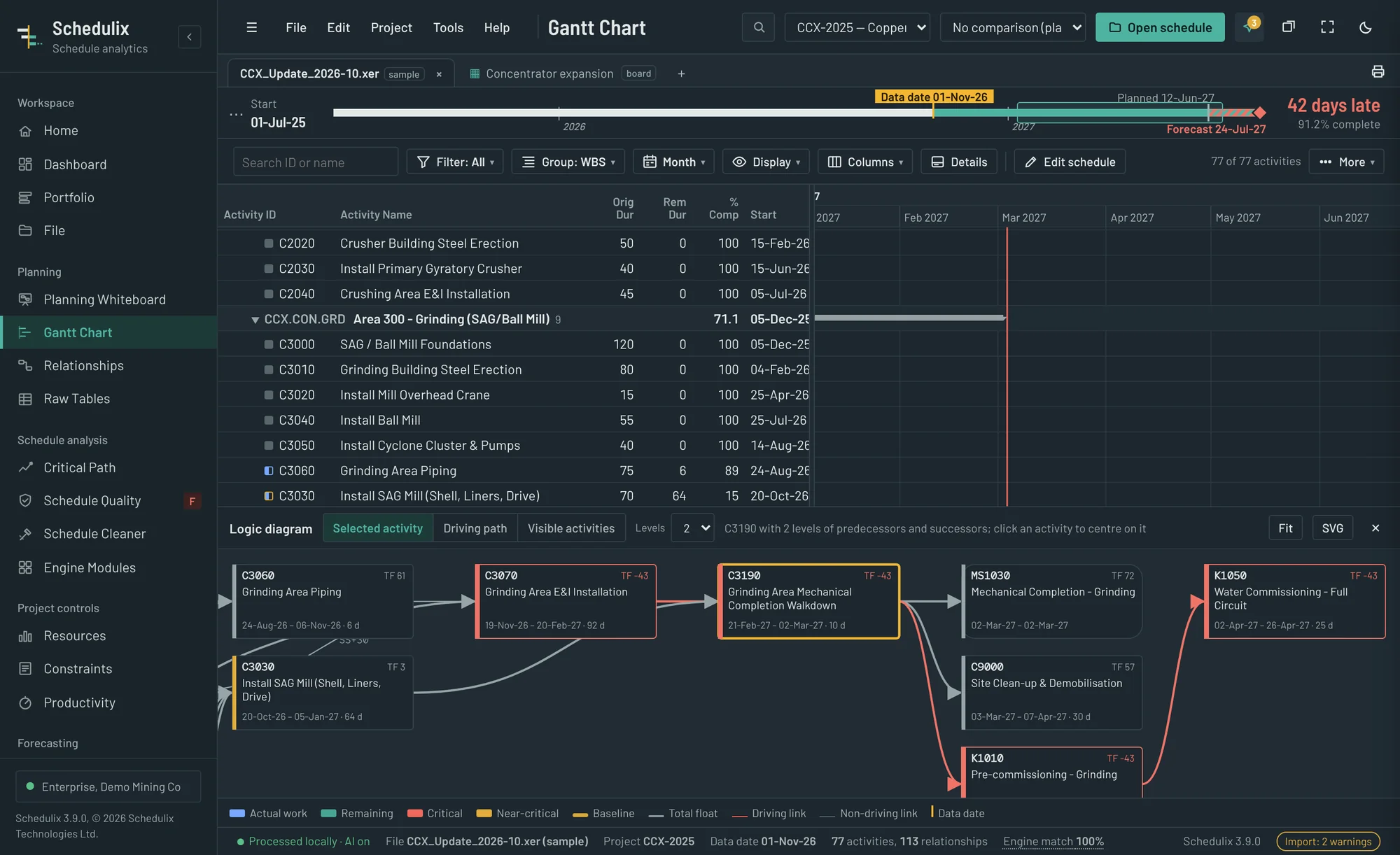
- Gantt chart with a logic diagram: group by any number of levels (WBS, resources, activity codes and more), collapse to a level, save layouts, and see predecessors and successors below the chart.
- Workspaces and folders: save the schedule, last period's update and your settings in one file, and organise projects in folders.
- Every detail kept: calendars and holidays, activity codes, user fields, resources and assignments, notebooks and multi-project files.
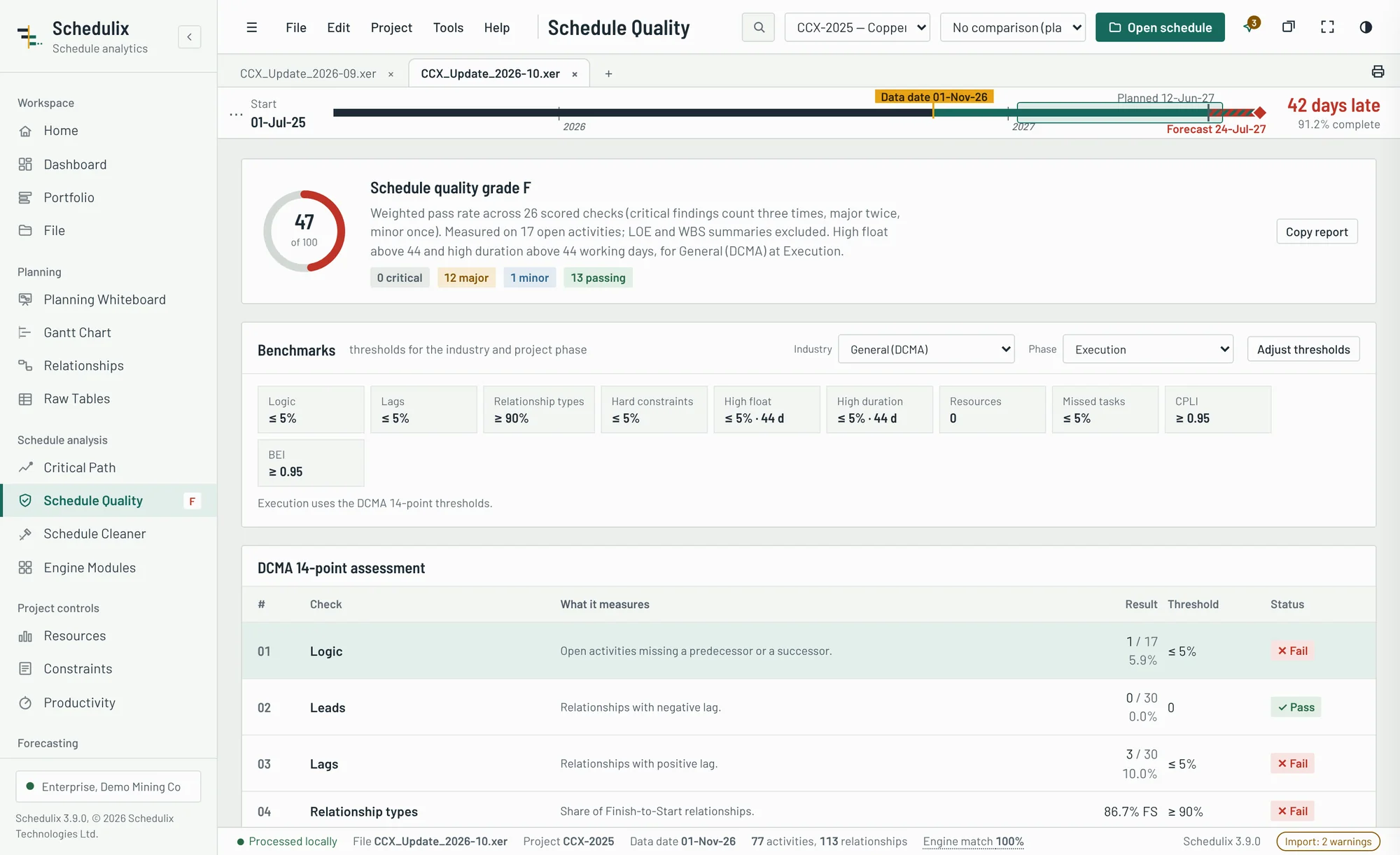
Find the quality problems before your client does
A full DCMA 14-point assessment plus extended checks, each listing the activities or relationships that fail and how to fix them.
- DCMA 14-point: logic, leads, lags, relationship types, hard constraints, high and negative float, high duration, invalid dates, resources, missed tasks, critical path test, CPLI and BEI.
- Extended checks: out-of-sequence progress, redundant logic, dangling activities, merge hotspots, progress anomalies and logic loops.
- Benchmarks by industry and phase: mining, construction, infrastructure, energy, oil and gas or IT, at Order of Magnitude, Pre-Feasibility, Feasibility or Execution, with thresholds you can adjust.
- One score, A to F, that you can track from update to update.
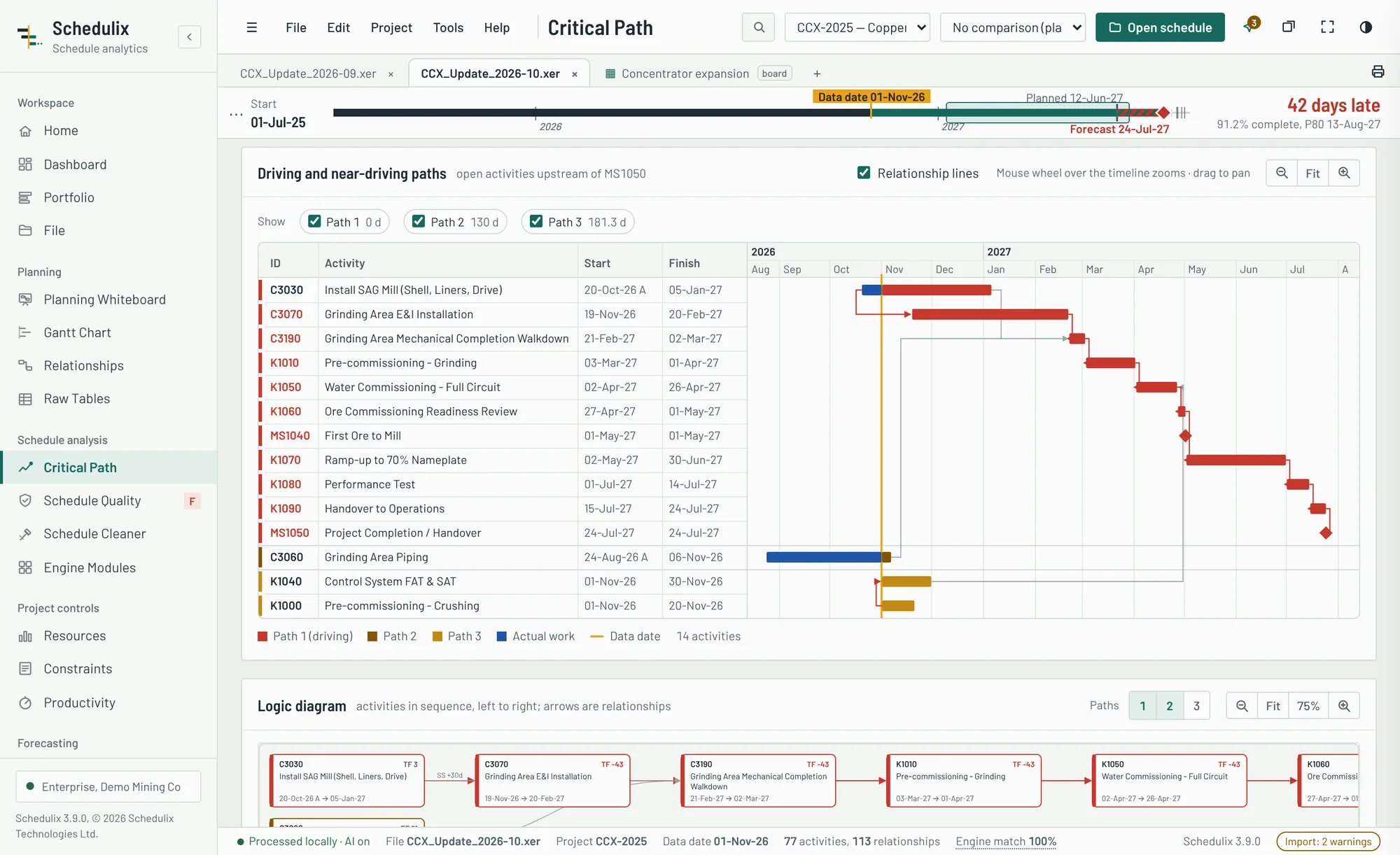
See exactly what drives every milestone
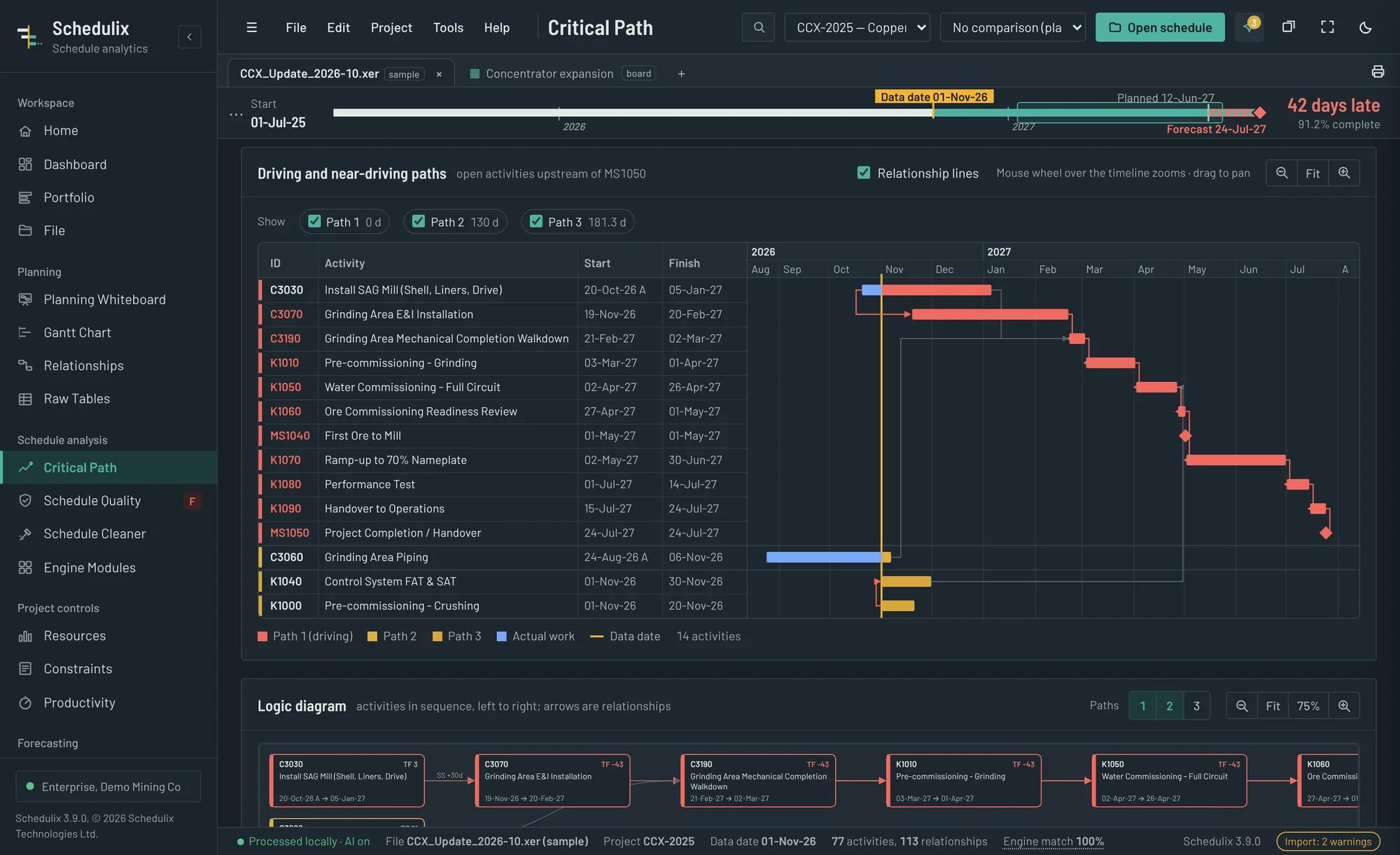
Pick a target activity and Schedulix traces the driving path back through the logic, then ranks the next float paths behind it.
- Driving and near-driving paths drawn on a timescale with target finish, total float and the open activities on each path.
- Multiple float paths to any target, using P6's own dates and calendars.
- Engine match: Schedulix's own forward and backward pass is compared with the file's dates, so you know when a schedule wasn't recalculated.
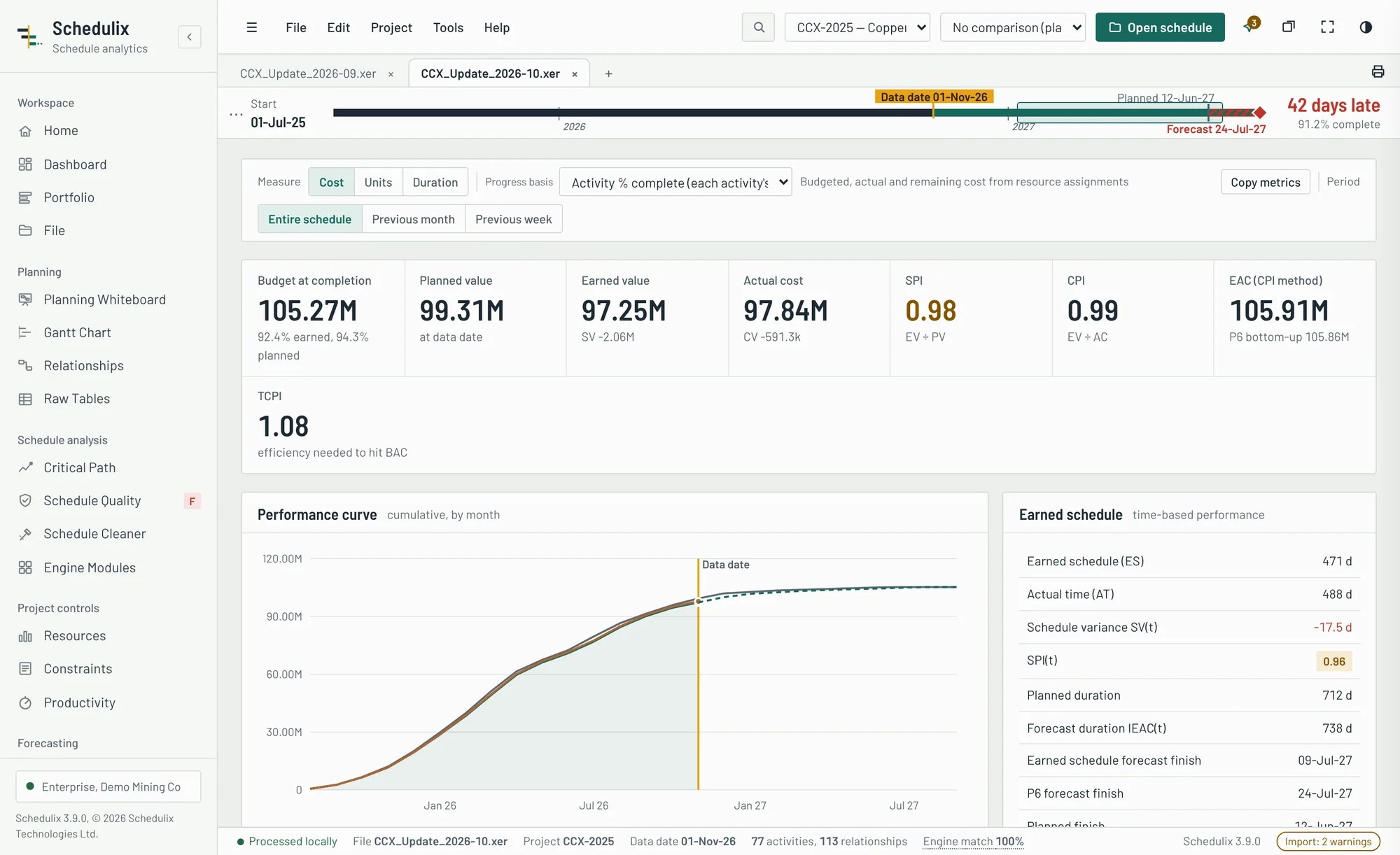
Earned value and earned schedule from the schedule itself
Cost, units or duration-weighted progress, with the performance indices your project controls manager reports every month.
- Planned value, earned value and actual cost curves with SPI, CPI, TCPI and EAC.
- Earned schedule SPI(t) and an independent forecast finish to set against the CPM date.
- Histograms of resources and cost by month, from the assignments in the file.
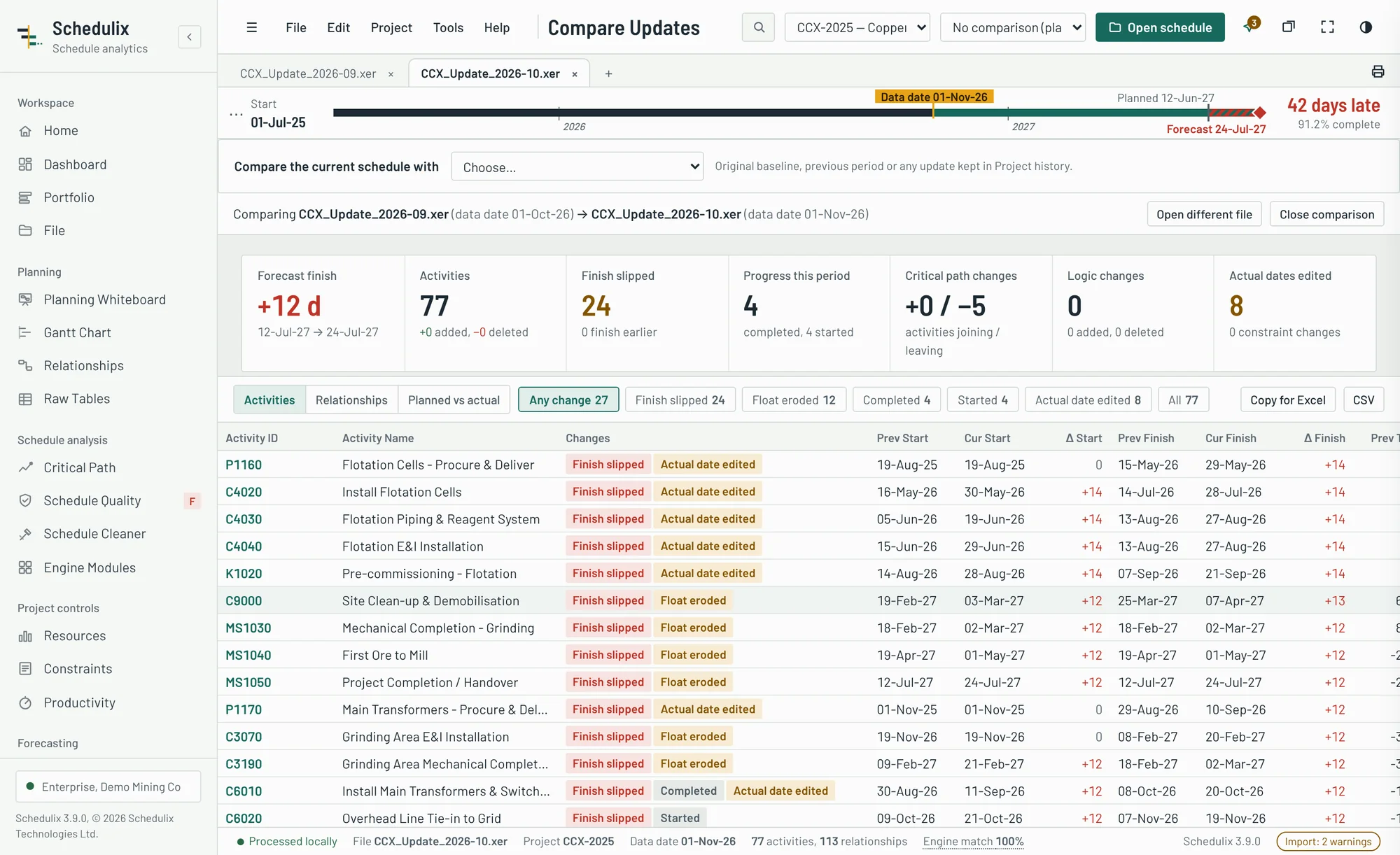
Know how far the finish moved, and why
Load last month's file next to this month's. Schedulix lists every change that matters to the forecast.
- Finish movement with the activities completed, started, slipped or added this period.
- Planned against actual: what last period's update planned for this period against what was achieved, with the period BEI.
- Logic and constraint changes, duration changes and edited actual dates, the changes reviewers most often miss.
- Critical path changes between the two updates.
A defensible P80 without a separate risk tool
A five-step workspace that follows AACE recommended practice 57R-09, run on the schedule you already have open.
- Summary schedule selected automatically from critical, near-critical and risk-linked activities.
- Three-point estimates and risk data sheets (triangular, BetaPERT, uniform or Trigen), exported to Word.
- Risk register from the file, CSV or an Excel paste, then a 12-check stress test before simulation.
- Results: finish distribution with P-values, risk and duration tornado charts, criticality index and milestone P-dates.
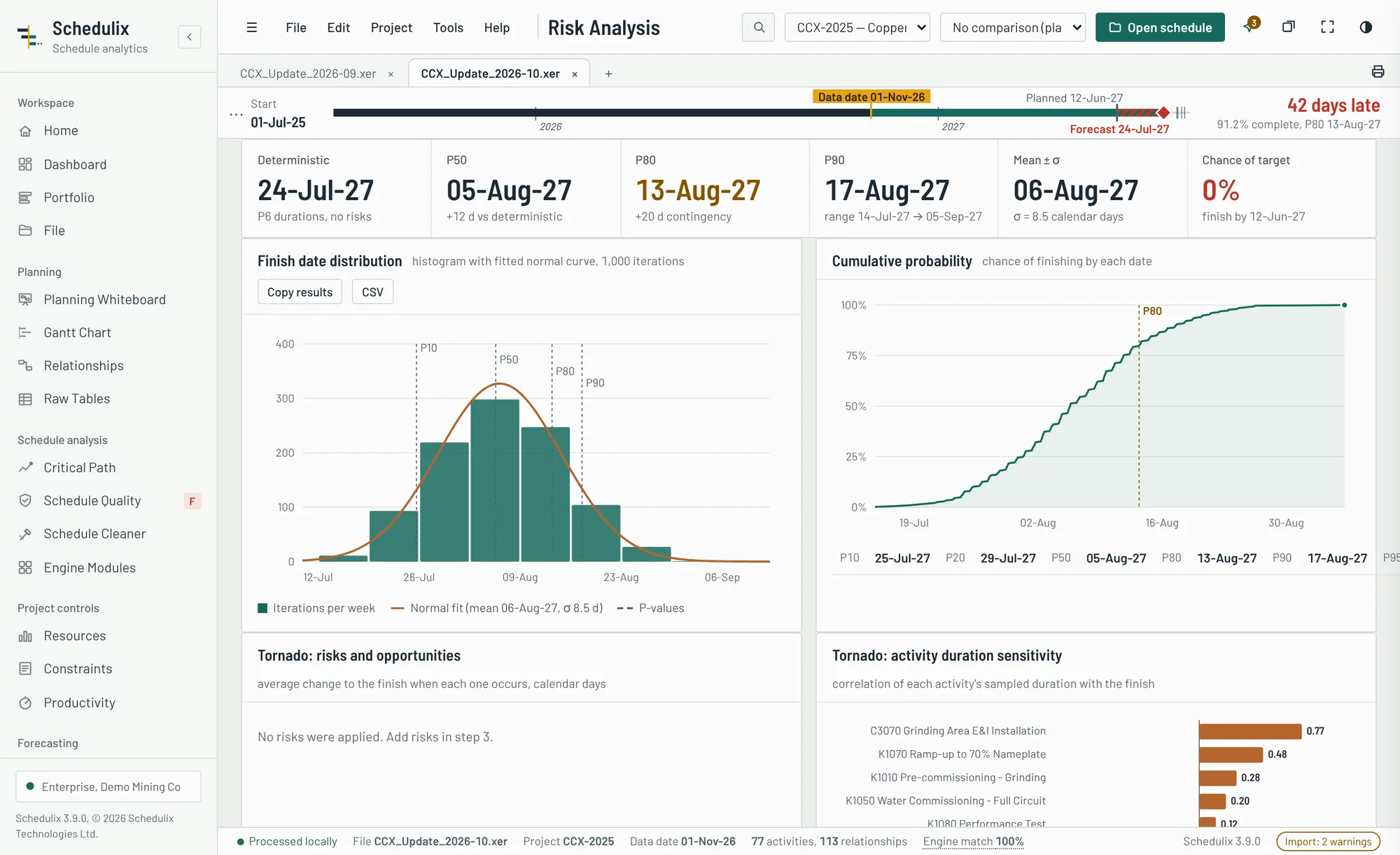
Clean contractor schedules and move to P6 Cloud with clean files
P6 Cloud import settings often mark global data as Do Not Import. Schedulix finds every dependency first, then rewrites the XER so the project keeps what it needs.
- 19 global data types including codes, calendars, resources, roles and user fields, each converted to project level, exported to CSV or left in place.
- Contractor clean-up: codes and calendars between global and project level, code and calendar reassignment, and stripping cost, progress, baselines and extraneous data, previewed and reversible.
- Hygiene fixes: external relationships, orphan records, control characters, field lengths and unused calendars.
- Nine verification checks, including an identical CPM recalculation, then one package: clean XER, CSV files, change log and report.
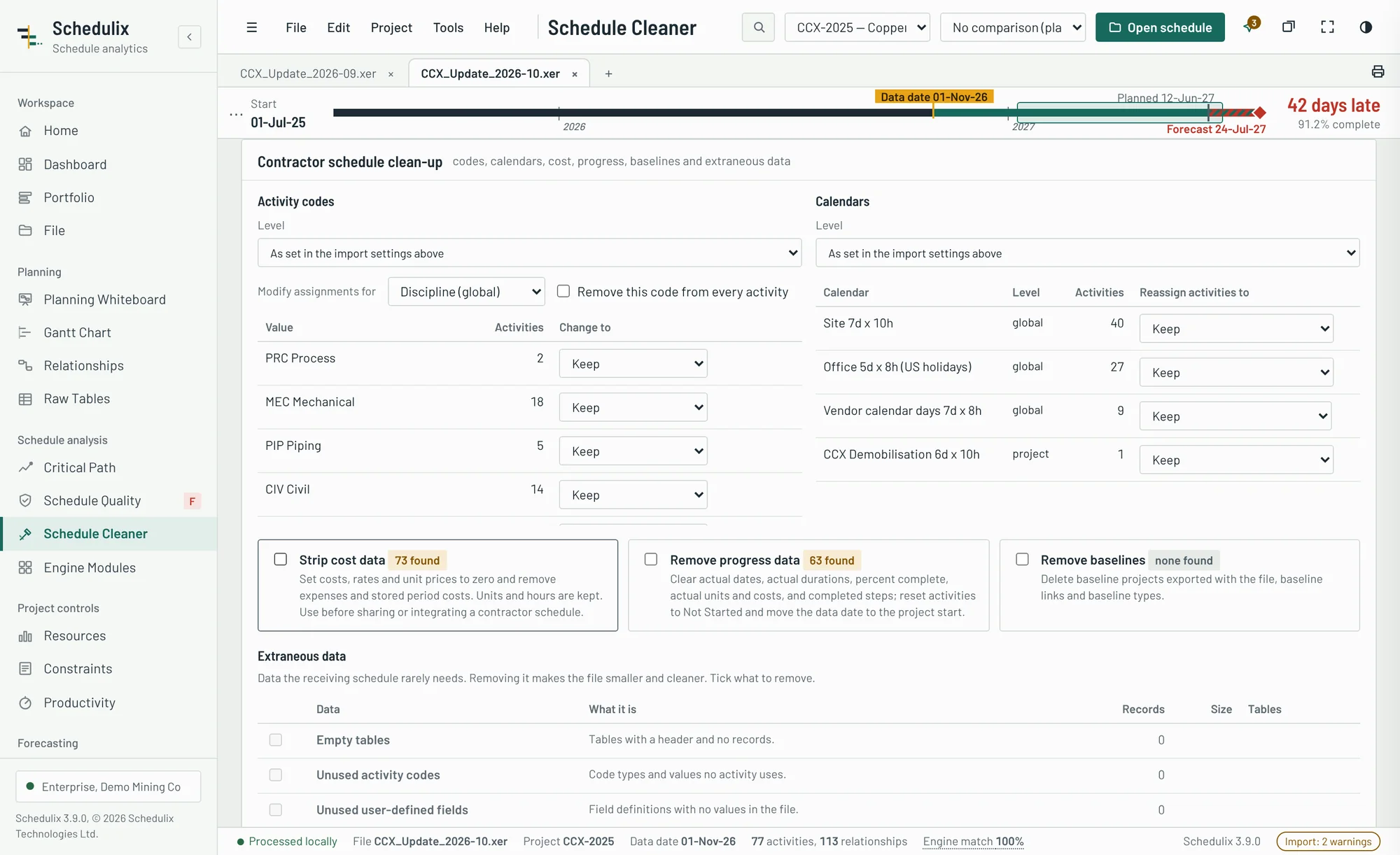
A client-ready report from every update
Executive summary, key metrics, quality findings, critical path and risk results in one document that prints to PDF.
- Written executive summary generated from the schedule's own numbers.
- Your branding on Enterprise reports, and Word exports for narratives and risk data sheets.
- Choose the sections, or produce a weekly progress report: planned against actual for the week plus a two-week look-ahead.
- Every table to Excel, for the analysis you still want to do yourself.
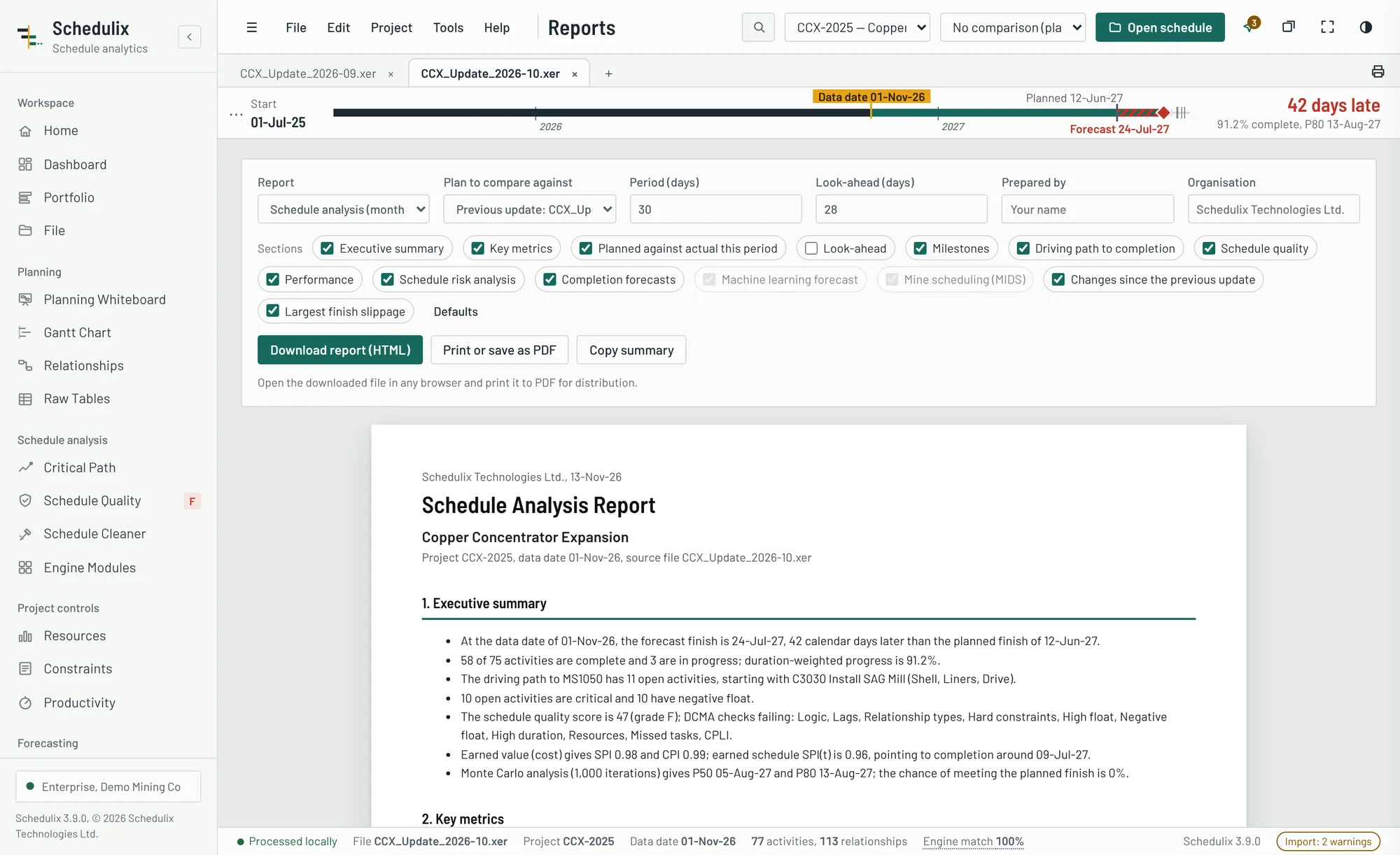
Six modules, from CPM to machine learning
One engine runs every analysis on your own schedule: calculation, critical path, risk, resource optimisation, forecasting and intelligent scheduling. See what each algorithm found, and time them all with one click.
- Critical path drag: how many days each driving activity really holds back the finish, recalculated by the engine.
- Bayesian risk network: risks that make other risks more likely, sampled together in the Monte Carlo, with a diagnosis of what a late finish means.
- Cost-optimal recovery: a mixed-integer program finds the cheapest crashing and fast-tracking to meet a date, checked by the engine, with the time–cost curve and a recommended strategy.
- Forecasts that disagree honestly: earned schedule regression and exponential smoothing beside CPM, Monte Carlo and machine learning dates.
Learn from finished work, forecast the rest
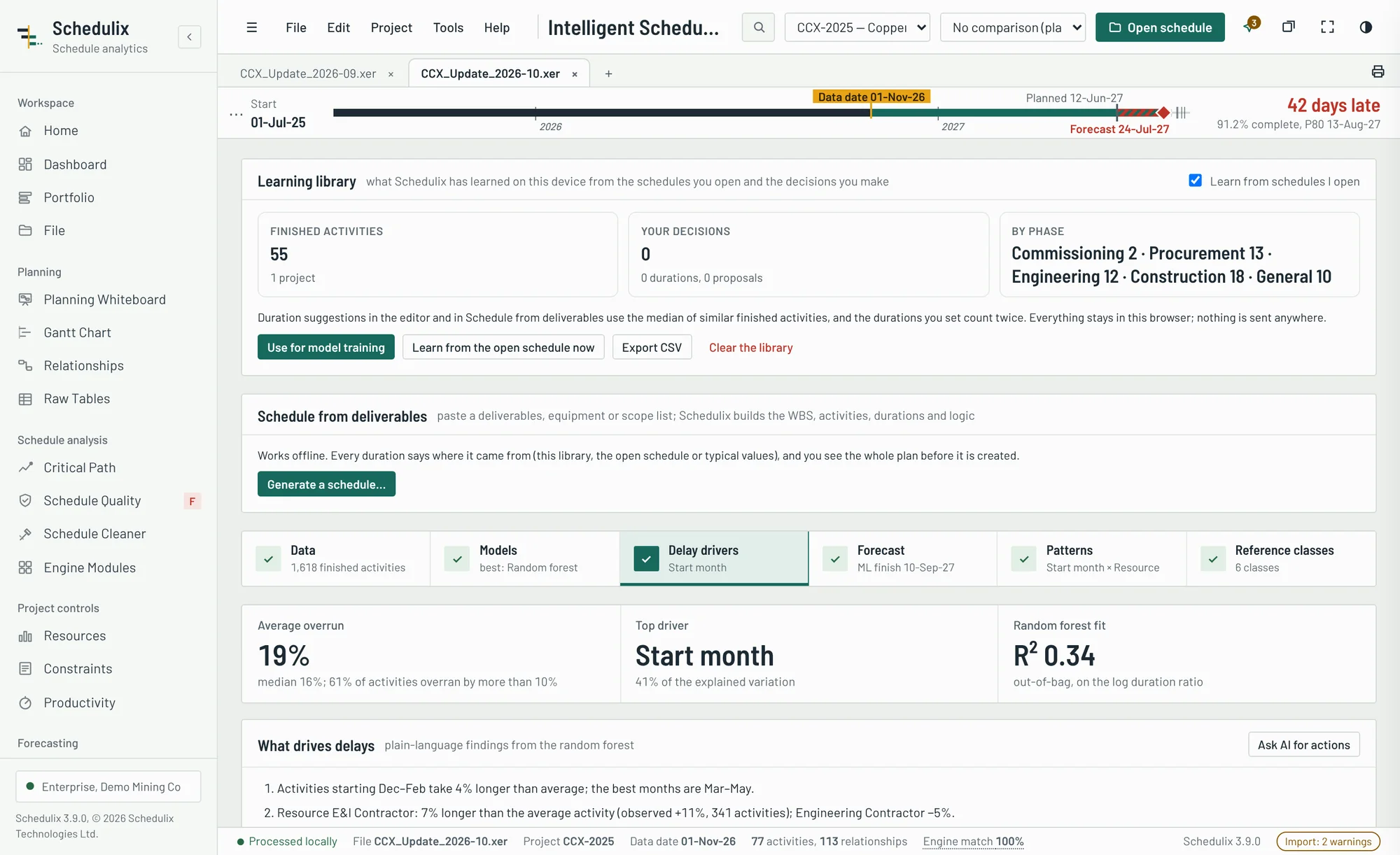
Schedulix trains machine learning models on finished activities from this schedule, your past projects or an activity history file, on your own computer, and uses them to forecast durations, delays and their causes.
- Five models compared honestly: regression, random forest, gradient boosting and a neural network, cross-validated on projects they haven't seen, against using the planned durations.
- Delay drivers in plain language: which disciplines, contractors, seasons and logic patterns make work overrun, and by how much.
- Forecast with reasons: each open activity's expected duration, P10–P90 range and chance of overrunning, an ML-adjusted finish and an ML-informed Monte Carlo.
- Reference classes: k-means groups similar work, so every range comes from how similar activities really went.
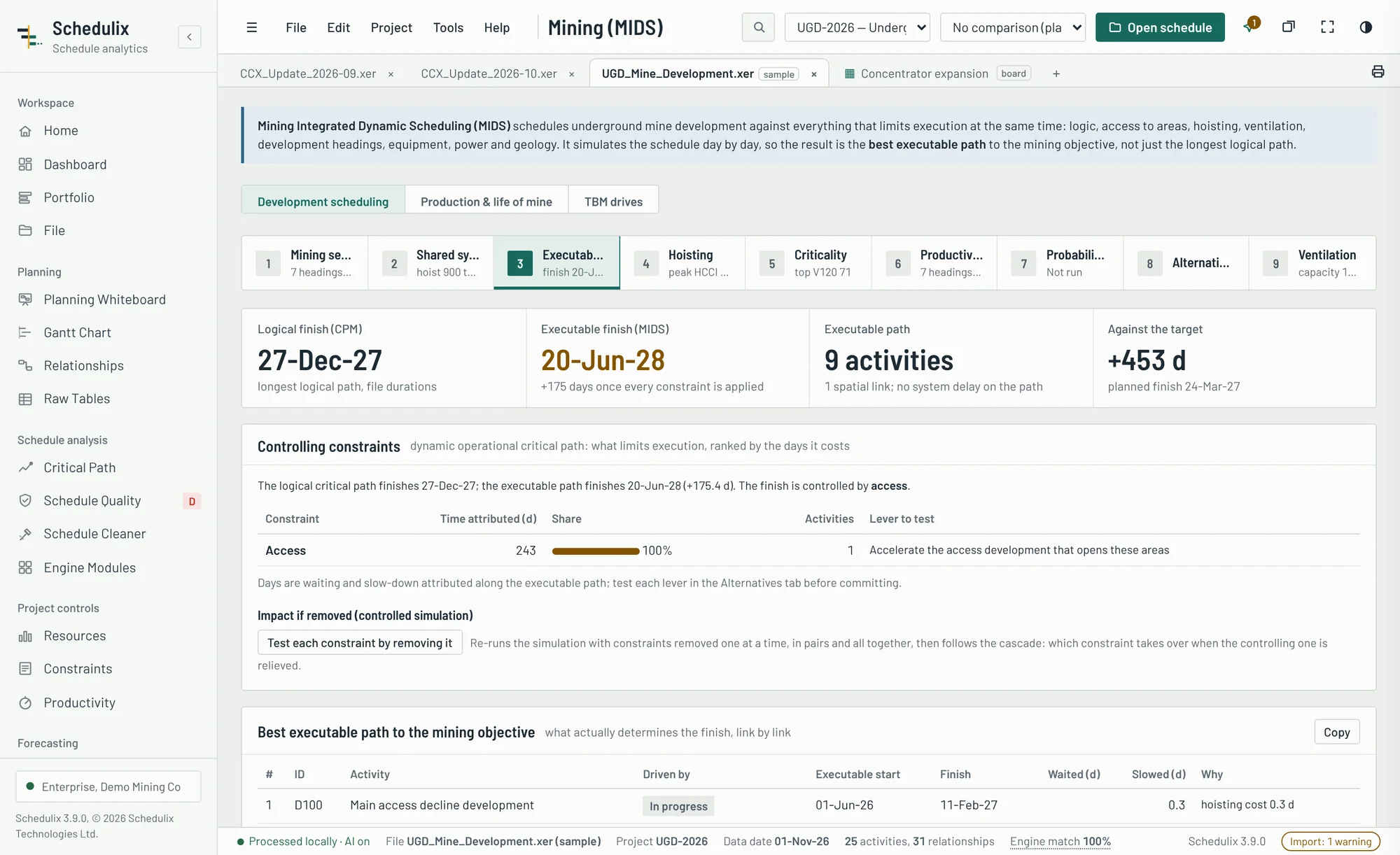
The best executable path, not just the longest logical one
Mining Integrated Dynamic Scheduling plans underground mine development against everything that limits execution at once: logic, access to areas, hoisting, ventilation, headings, equipment, power and geology, simulated day by day.
- Executable path: link by link, what really sets the finish: a predecessor, the development that opens an area, or a heading or airflow becoming free.
- Hoisting as a first-class constraint: daily HCCI and hoisting slack, and allocation scenarios judged by their completion dates.
- Mining criticality (MSCI) and productivity-based durations from metres remaining and actual advance rates, adjusted for ground class.
- P50, P80 and P90 under geological uncertainty, and Pareto alternatives that trade completion, conflicts, risk and cost.
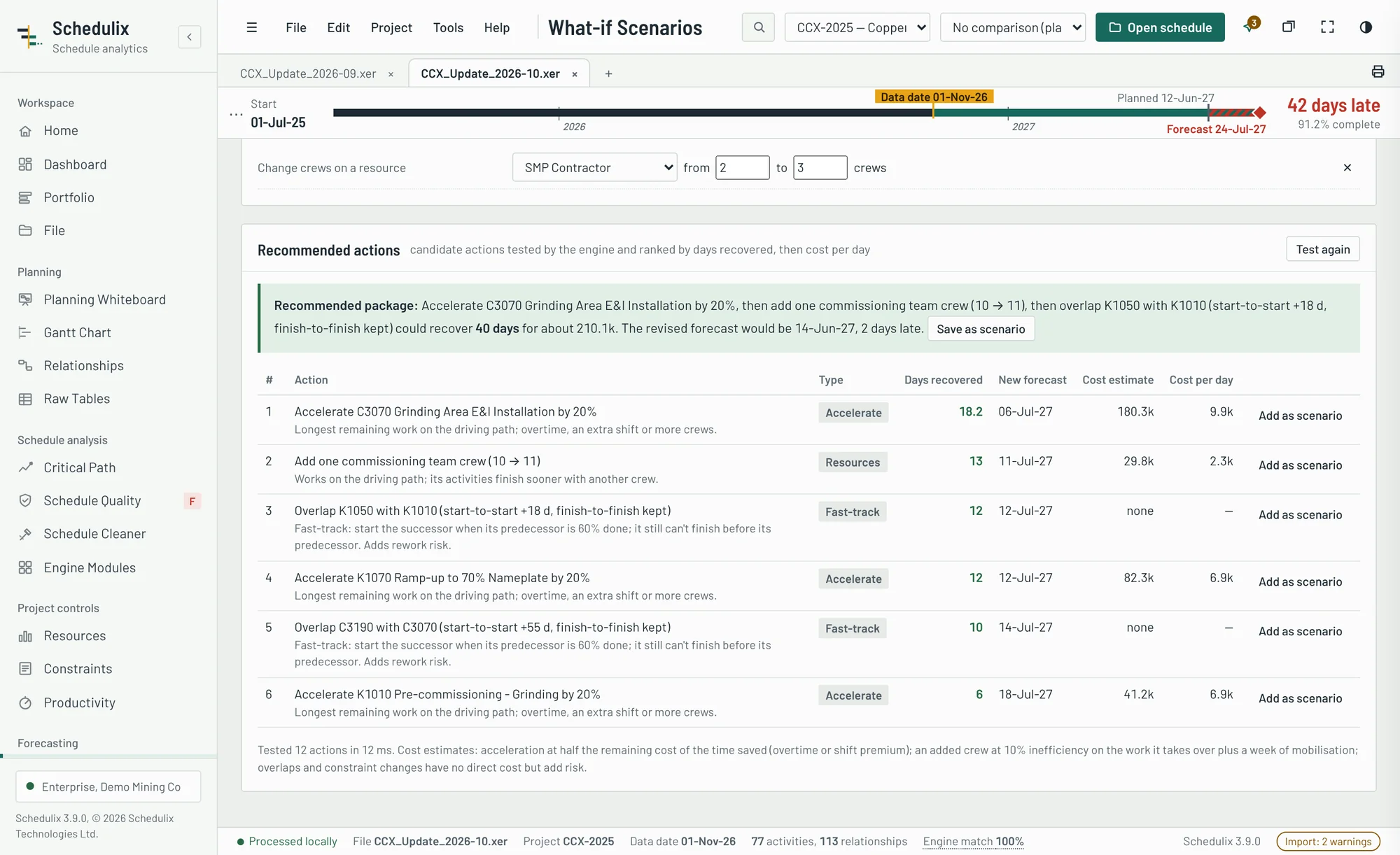
Test the recovery before you commit to it
Change crews, durations, sequencing and constraints, or a mine's hoisting, ventilation, headings and fleet, and see the new forecast from the engine. Schedulix also builds and tests recovery actions for you and ranks what actually moves the finish.
- Scenarios side by side: forecast completion, days against today and the baseline, cost, cost per day saved and milestone dates.
- Tested recommendations: acceleration, extra crews, overlaps and constraint changes from the driving path, plus mining levers simulated with MIDS, assembled into a recovery package the dashboard quotes.
- Productivity: earned against actual hours, unit rates and advance rates, and the forecast at today's productivity.
- Constraint register: permits, deliveries, access and shutdowns linked to the work, with need dates, float and the delay each would cause.
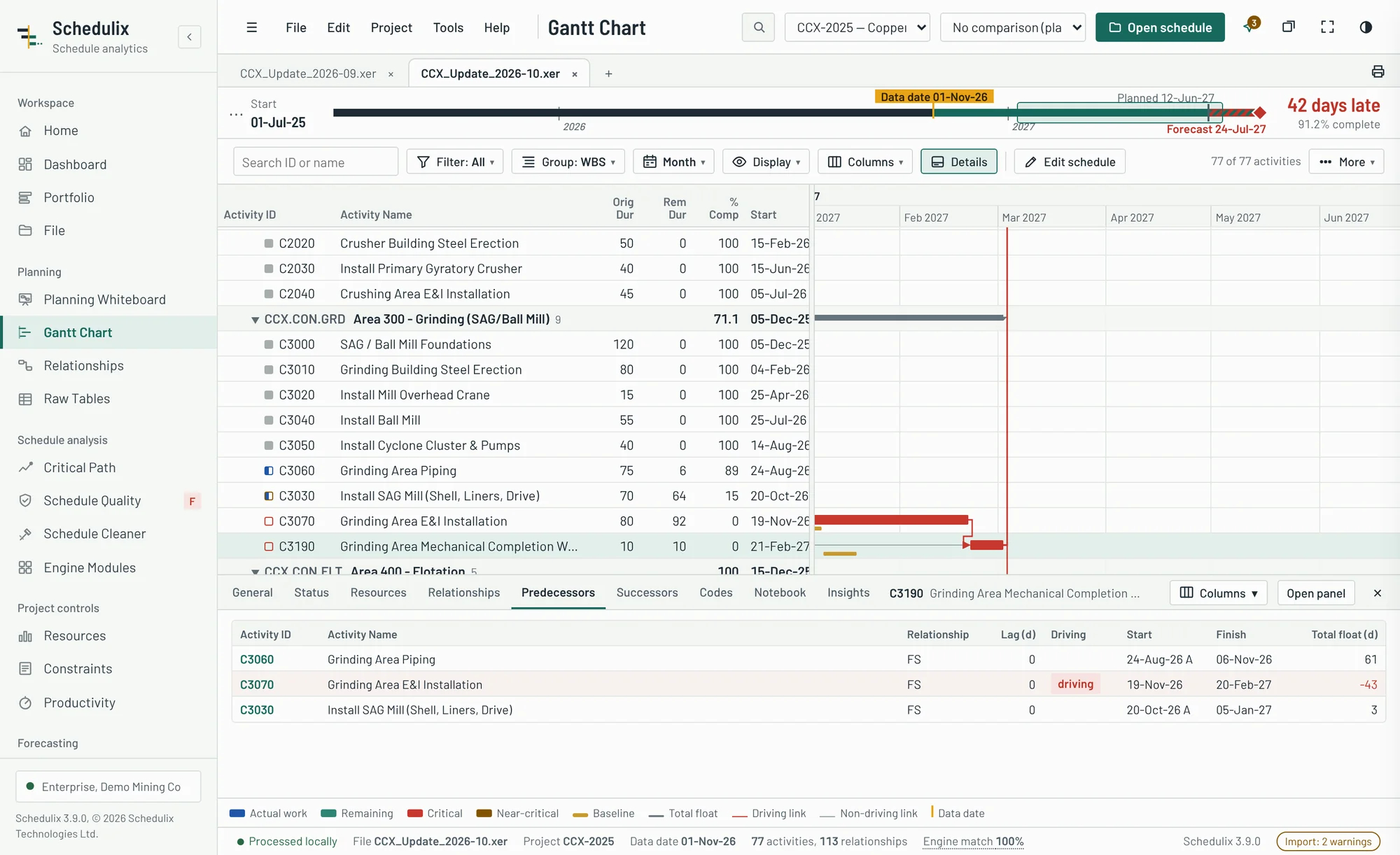
Every activity's detail under the Gantt, the way P6 users expect
Select an activity and its dates, status, relationships, resources, codes and notes open in a pane under the chart. The mouse does the rest: wheel to zoom, drag to move through time.
- P6 layout: General, Status, Resources, Relationships, Predecessors, Successors, Codes, Notebook and Insights tabs, with the relationship columns you choose.
- Always in step: the pane follows the selected activity, the scroll position and the filter; drag its divider to give it more room.
- Mouse-first timescale: the wheel zooms around the pointer and changes units by itself, from years down to days; click the project timeline strip to jump to a date.
- Full screen at any resolution: F11 gives the schedule the whole screen, from a laptop to a 4K monitor.
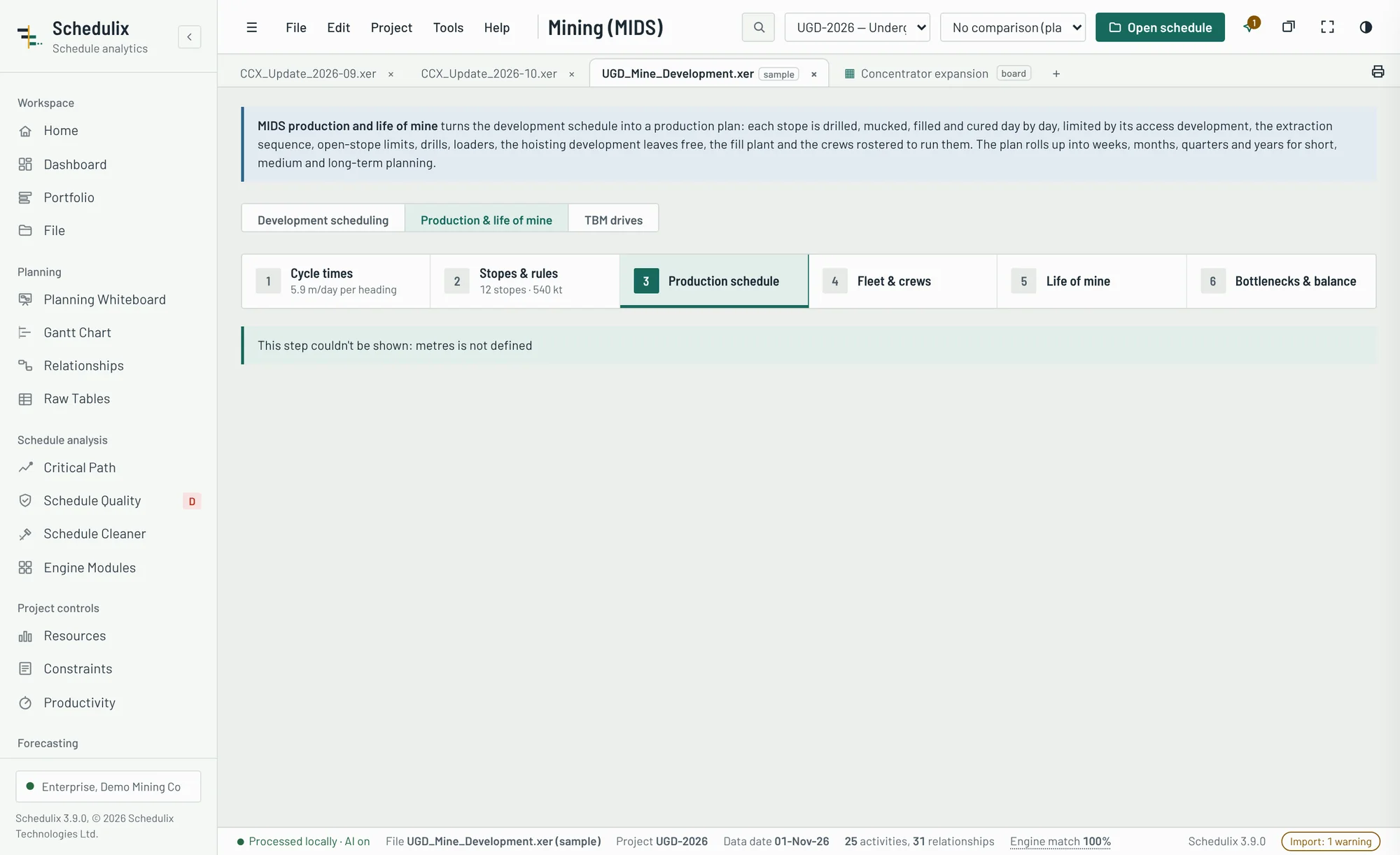
From the development schedule to tonnes, month by month
MIDS Production turns development finish dates into stope access, then simulates drilling, blasting, mucking and backfill day by day against the rigs, loaders, crews, fill lines and hoist you actually have.
- Cycle times at the face: drill, charge, blast and re-entry, muck, scale, ground support by class and services, and the metres per day they allow.
- Stopes and backfill: paste, cemented rock and rock fill with cure times, primary and secondary sequencing, and active stopes per level.
- Life of mine: ore, metal and fill by week, month, quarter or year, against targets and actuals, with the development against production balance.
- Bottlenecks and levers: lost days attributed to each constraint, eight levers ranked by NPV, and an extraction-sequence optimiser.
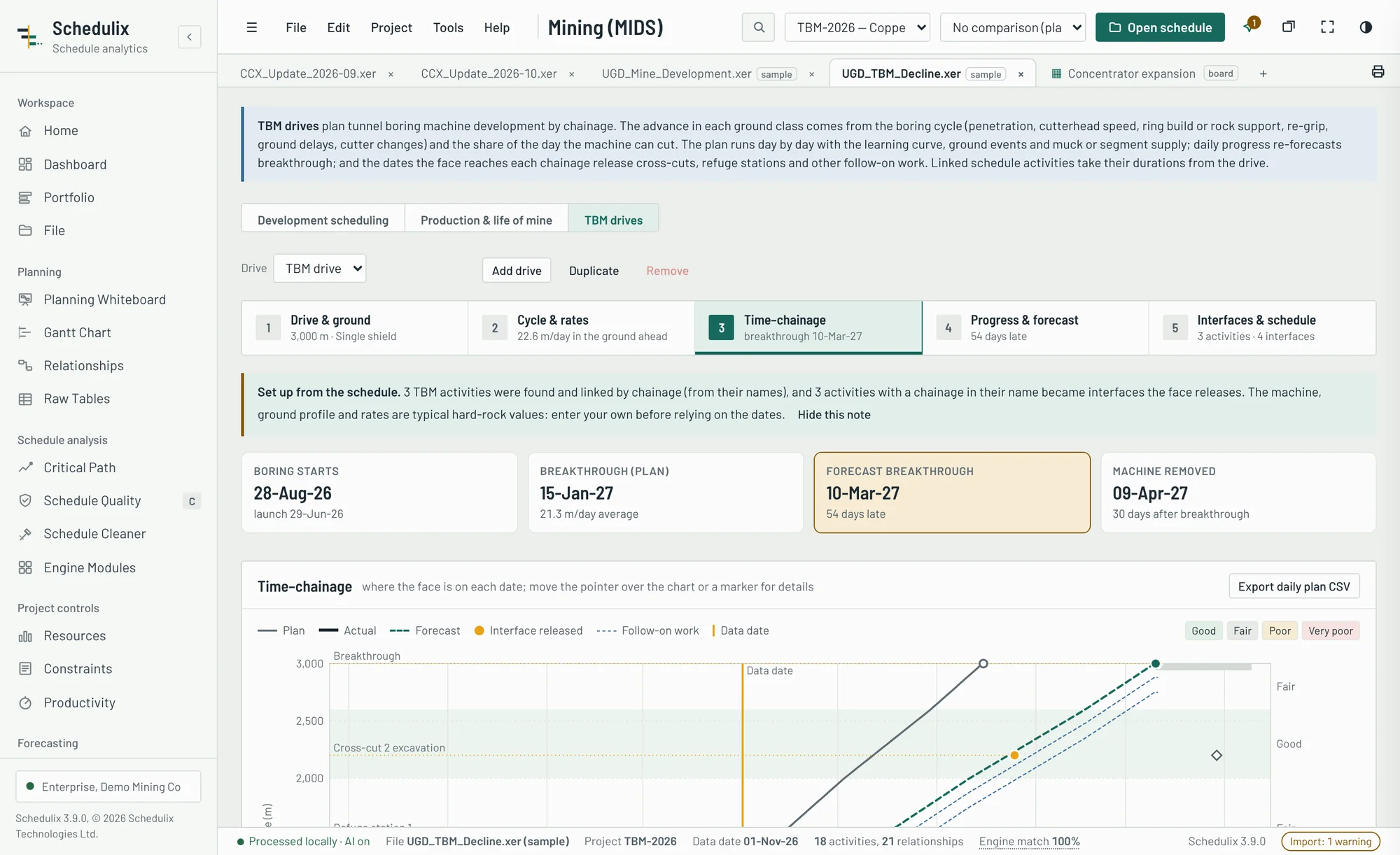
Tunnel boring planned by chainage, not guesswork
For development bored by a tunnel boring machine, Schedulix plans the drive by chainage. The advance comes from the boring cycle and the ground ahead, and the dates the face reaches each chainage drive the rest of the schedule.
- Advance by ground class: penetration, cutterhead speed, ring build or rock support, re-grip, ground delays and cutter changes give the metres per day in each class.
- Day-by-day plan: the learning curve, ground events and muck or segment-supply limits, on a time–chainage chart with plan, actual and forecast.
- Re-forecast from progress: achieved rates by ground class move the breakthrough date and raise early warnings for the ground ahead.
- Interfaces and the schedule: cross-cuts and refuge stations released by the face, and durations for the linked activities applied as a proposed schedule.
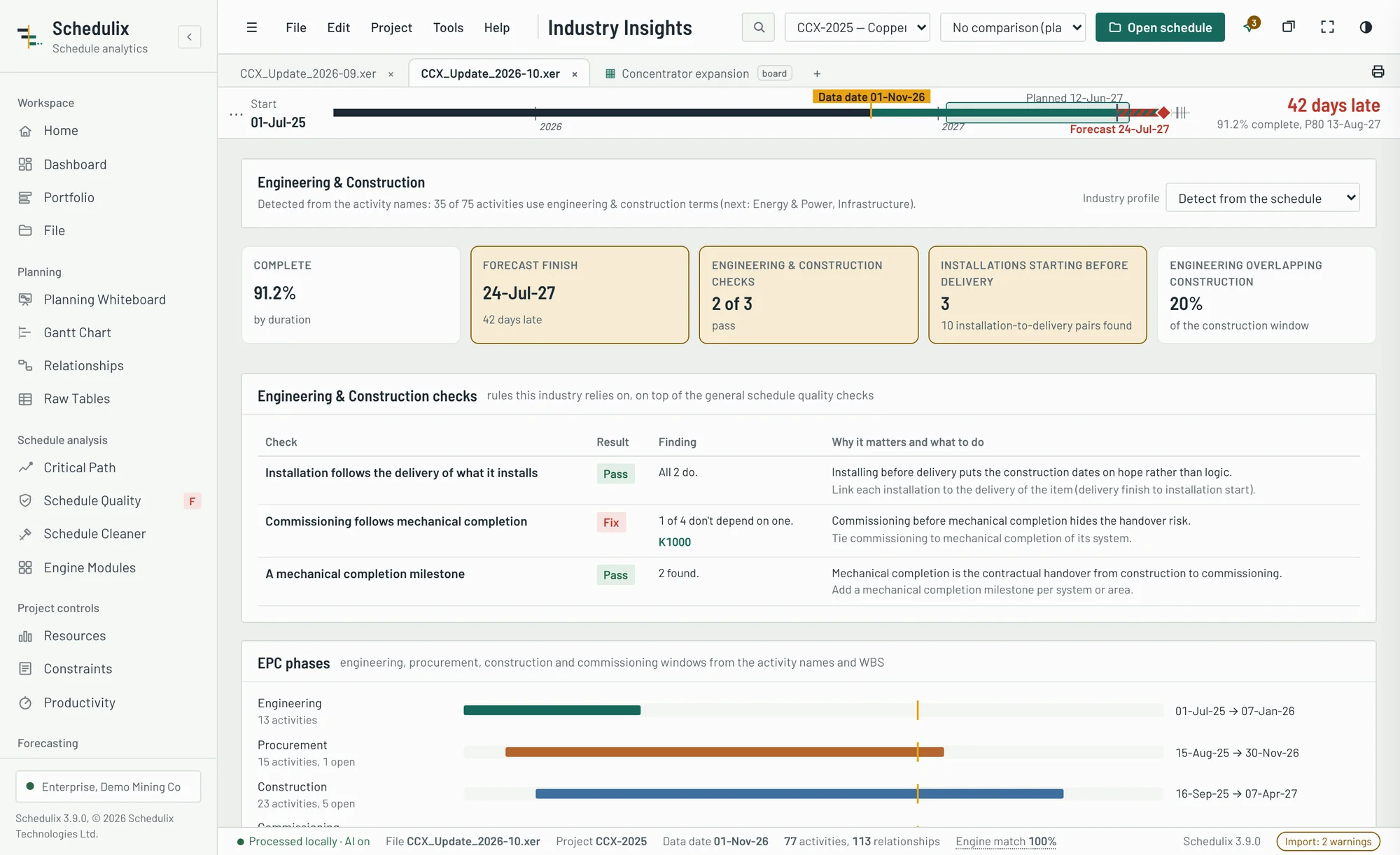
One application, tuned to your industry
Schedulix recognises the type of project from the schedule and applies that industry's checks, KPIs and analyses. Mining is one profile of nine.
- Nine profiles: engineering and construction; mining and underground; oil and gas; energy and power; manufacturing; infrastructure; IT; industrial; maintenance and shutdowns.
- Industry checks: required sequences such as commissioning after mechanical completion, round-the-clock calendars for shutdowns, and duration limits.
- Industry analyses: the EPC chain, shutdown windows, IT releases, seasonal work windows and manufacturing lines.
- Templates: new starting schedules for oil and gas, power, industrial projects and shutdowns.
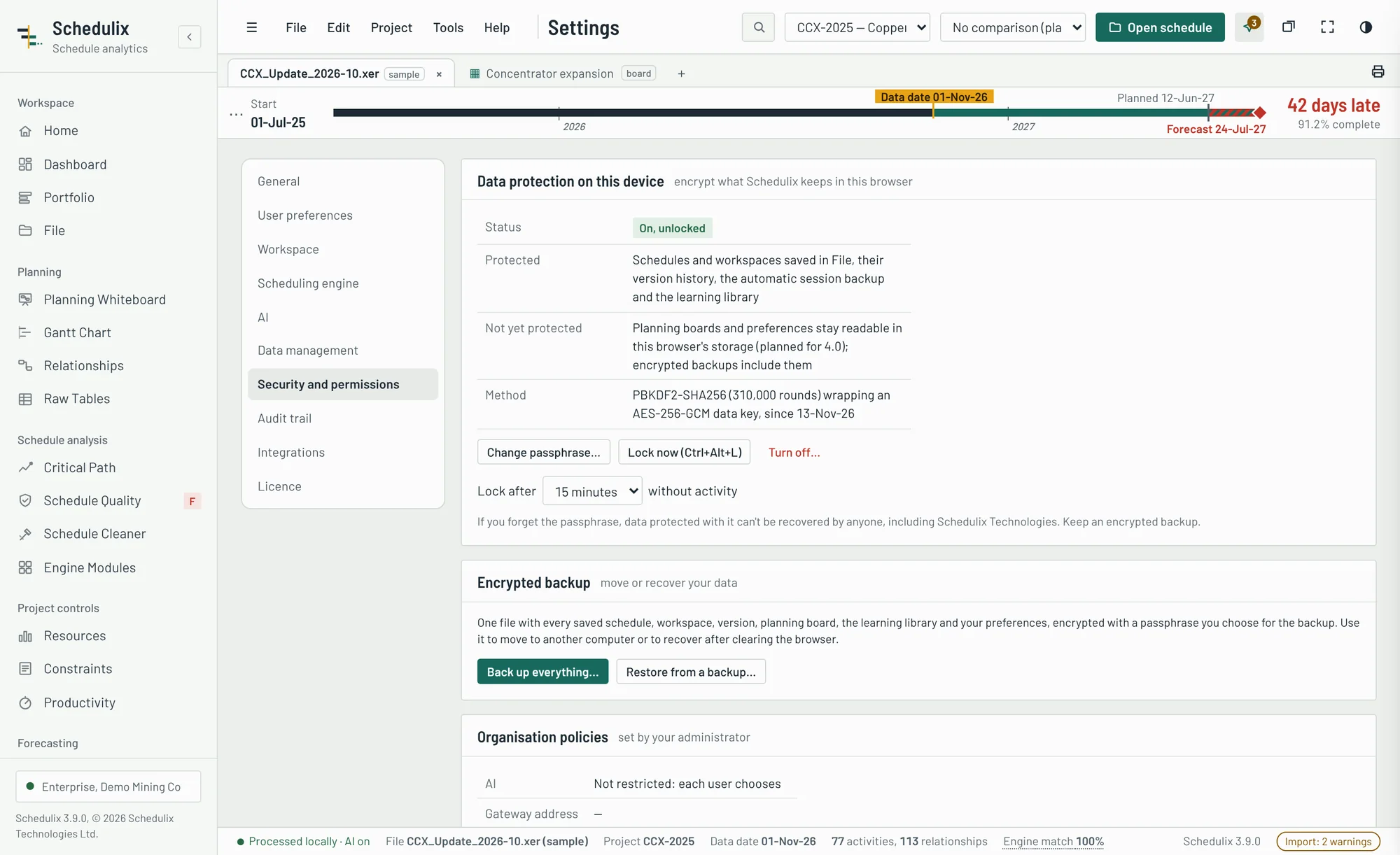
Your schedules stay on your computer, encrypted if you choose
Schedulix needs no server and sends nothing to us. Settings › Security adds a passphrase that encrypts the library, versions, autosave and learning data saved in the browser.
- Strong encryption: AES-256-GCM with a key derived from your passphrase (PBKDF2, 310,000 rounds).
- Automatic lock: after a set idle time, or at once with Ctrl+Alt+L.
- Encrypted backups: restore by merging or replacing, on this computer or another.
- Audit trail and strict security policy: every change is logged with its before and after values, and only Schedulix's own scripts can run.
See it on your own schedule
Bring an XER or Microsoft Project file to a 30-minute demo, or start a free trial today.
A scheduling assistant that reads the logic, not just the text
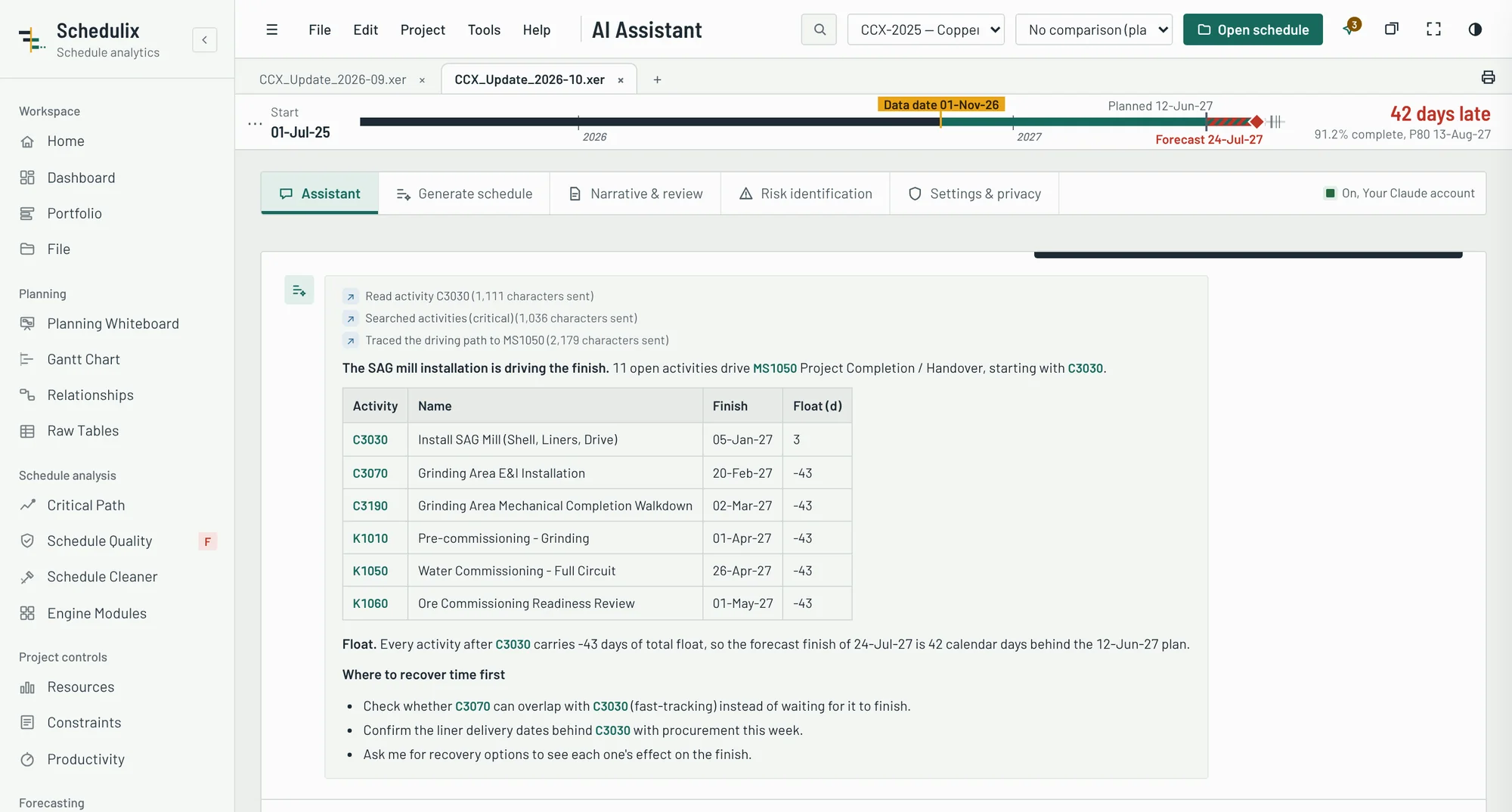
Schedulix gives Claude a precise summary of your schedule and lookup tools into the network, so answers name real activities, real dates and real float, and every activity ID links back to the schedule.
Help where planners spend their hours
Each capability produces a draft you review, edit and approve. Nothing is applied to your schedule without your say-so.
Ask questions in plain language
"What drives the handover milestone?" "Which activities lost float this month?" The assistant looks up activities, traces driving paths, reads WBS branches and lists quality findings, then answers with linked activity IDs.
Draft the monthly report in minutes
Monthly progress narrative, schedule quality review, critical path analysis, recovery options, an executive brief or a look-ahead, written from the update's own numbers and exported to Word.
Find the risks the register missed
Suggested threats and opportunities with cause, effect and linked activities, plus three-point ranges for the risk summary schedule. You choose which go into the register.
From scope description to first-cut schedule
Describe the scope or start from an industry template: construction, infrastructure, energy, manufacturing, IT, process plant or mining. Schedulix builds the WBS, activities, durations with their basis and logic, repairs broken links and loops, and exports a P6 XER.
Intelligent Scheduling needs no AI account
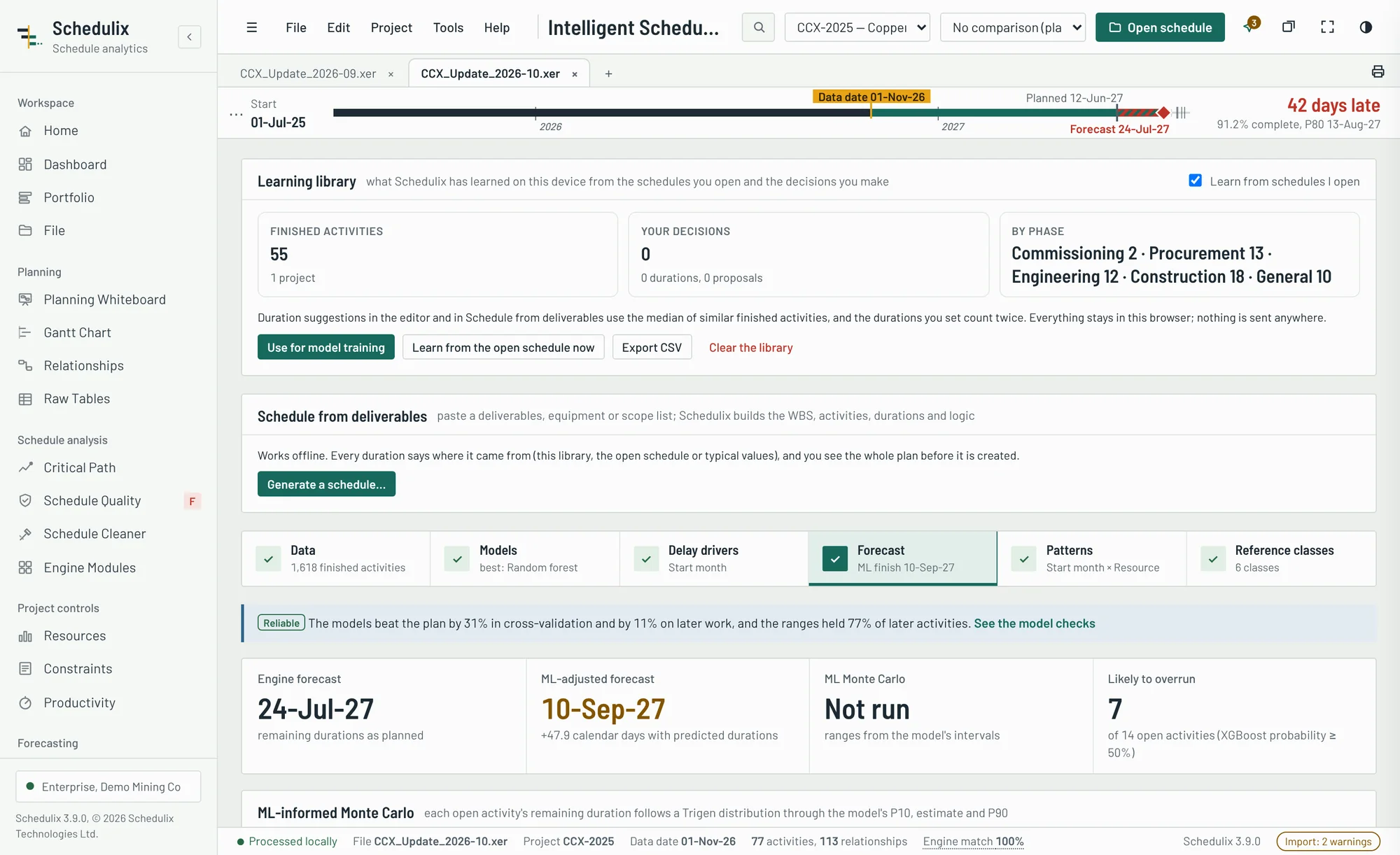
Separate from the assistant, Schedulix's own models learn from your finished activities and run entirely in the browser: nothing is sent anywhere, and they work on every Enterprise licence.
- Predicts each open activity's duration, range and chance of overrunning, with its three main reasons.
- Explains what drives delays across your projects, in plain language.
- Shows its accuracy: every model is tested on projects it hasn't seen before you rely on it.
Grounded in your schedule at every step
General-purpose chatbots guess at a schedule from an export. Schedulix answers from the calculated network.
Compact schedule digest
Dates, driving path, milestones, quality findings, slippage, look-ahead, earned value and risk results.
Tools into the network
Find activities, read an activity's logic, trace a driving path, open a WBS branch or a quality check.
Claude reasons over facts
Answers cite activity IDs, dates and float that come from your file, not from general knowledge.
You check and decide
Every activity ID opens in the schedule. Drafts are exported for your review, never applied automatically.
Off by default. Your account. Your rules.
Owners, contractors and public agencies treat schedules as commercially sensitive. The AI features are designed to pass the same review as the rest of Schedulix.
Opt-in per user
The assistant does nothing until a user switches it on in Settings.
Your own Claude account or API key
Requests run on the customer's Claude plan or Anthropic API key. Nothing passes through Schedulix's servers.
Review before sending
Each request can be shown in full before it is sent. This is on by default.
Choose what is shared
Decide whether activity names, costs and notebook text are included.
Session log
A log lists exactly what was sent during the session.
Enterprise edition
AI is included with Enterprise and available in evaluation mode to try.
One schedule, many responsibilities
Owners, capital project teams, engineers, constructors and EPC/EPCM firms each need different answers from the same file. Schedulix gives each of them theirs.
Review every contractor submission the same way
Monthly updates arrive from several contractors, in P6 and Microsoft Project. Your team has days, not weeks, to accept or reject them.
The challenge
- Inconsistent quality across contractors
- Finish dates that move without explanation
- Logic changes hidden inside large updates
With Schedulix
- A quality grade on receipt, with the failing activities listed
- Compare updates to see what moved the finish
- Forecast against plan in a client-ready report
Confidence levels for stage gates and funding
Steering committees and lenders ask how likely the date is, not only what the date is.
The challenge
- Single-point dates presented as certain
- Risk analysis outsourced and slow
- No common standard across the portfolio
With Schedulix
- P50 and P80 dates from a 57R-09 workflow
- Risk register linked to the schedule logic
- The same checks and report on every project
Faster health checks, audits and delay reviews
Consultants are paid for judgement. Schedulix does the mechanical part of a schedule review so the time goes into findings.
The challenge
- Days spent extracting data from P6
- Clients on P6 and Microsoft Project
- Findings that must stand up to scrutiny
With Schedulix
- Open the client's file directly, no P6 licence needed
- Float erosion and driving path changes between updates
- Results checked against the file by the engine match
Submit schedules that pass the owner's review first time
Rejected updates cost payment cycles. Check your schedule the way the owner will, before you send it.
The challenge
- Updates returned for missing logic and constraints
- Subcontractor schedules in Microsoft Project
- Little time for analysis on site
With Schedulix
- DCMA checks with the exact activities to fix
- Subcontractor MSP files opened alongside P6
- A look-ahead and narrative drafted by the assistant
Control the path from engineering to handover
Engineering, procurement, vendor packages and construction meet in one integrated schedule. The driving path crosses all of them.
The challenge
- Vendor and package schedules in mixed formats
- Long-lead procurement driving commissioning
- Moving the P6 database to P6 Cloud
With Schedulix
- Driving paths traced through procurement to handover
- Risk ranges on long-lead items with tornado ranking
- Schedule Cleaner with verified migration packages
Where Schedulix works
Logic-driven schedules with thousands of activities, long-lead equipment and contractual milestones.
Straightforward pricing for every team size
Annual subscriptions per user, a perpetual option for Professional, a site licence for Enterprise and a fixed price per P6 Cloud migration.
Prices in USD. Taxes are added at checkout where they apply. Site licences cover one legal entity.
Full edition comparison
Upgrade at any time with a new key. Your files, settings and risk work stay where they are.
Pricing and licensing FAQ
How does the free trial work?
Download Schedulix and use every feature, including risk analysis and the AI assistant, in evaluation mode. Until a licence key is added, exports and reports carry an evaluation watermark and risk simulations are limited to 500 iterations.
Is my schedule uploaded anywhere?
No. Schedulix reads and analyses files on your computer and sends nothing to us. The only exception is the optional AI assistant, which a user must switch on and which sends requests to their own Claude account or Anthropic API key.
How are licences delivered and activated?
You receive a signed licence key by email. Paste it into Schedulix and it is verified on the computer, with no activation server and no internet connection needed.
Can we pay by purchase order and invoice?
Yes. Site licences and multi-seat orders can be invoiced against a purchase order with bank transfer. Card purchases go through our reseller, which handles sales tax and VAT.
What does the AI assistant cost?
Schedulix doesn't charge for AI usage. Requests run on your organisation's own Claude plan or Anthropic API key, which Anthropic bills directly.
What does the perpetual licence include?
A perpetual Professional licence never expires and includes 12 months of updates. After that you keep the version you have, or renew updates for a further year.
We are migrating to P6 Cloud. Which edition do we need?
The Migration licence covers unlimited XER clean-up for 90 days with verification reports and an onboarding call. Professional and Enterprise also include clean-up for ongoing use.
Need a quote for your team?
Tell us how many planners and projects you have, and we'll send a quote within one business day.
Learn Schedulix, and better scheduling practice
Step-by-step tutorials, product documentation for users and IT, and articles on schedule quality and risk.
Built by a planner, for the people who answer for the schedule
Schedulix began on a copper mining project, where every month brought a stack of contractor updates and too little time to check them properly.
The tools available were either simple viewers or enterprise suites that cost thousands per seat and wanted the schedules on someone else's server. Mining owners and EPCMs treat schedules as commercially sensitive, so uploading them was rarely an option.
Schedulix was written by a senior planner and scheduler to close that gap: analysis-suite depth at close to viewer prices, running entirely on the user's computer. Every check, every forecast and every risk result is calculated from the file and can be traced back to it.
Today Schedulix builds new schedules as well as reading Primavera P6 and Microsoft Project files, and serves planners, project managers, owners, contractors and consultants in construction, infrastructure, energy, manufacturing, IT and engineering. Mining planning, where it all began, is now a dedicated module.
- Company
- Schedulix Technologies Ltd., incorporated in Canada · schedulix.ca
- Product
- Schedulix 2.9, released November 2026
- Formats
- Primavera P6 XER and XML, Microsoft Project XML
- Methods
- DCMA 14-point assessment, earned value and earned schedule, AACE 57R-09 schedule risk analysis
- Data
- Processed on the customer's computer; no uploads or telemetry
- Support
- Email support for every edition; priority response for Enterprise
How we build Schedulix
Four commitments that shape every release.
Local by design
The schedule stays on the user's machine. Features that need the cloud are opt-in and use the customer's own accounts.
Planner-built
Features come from real project controls work: monthly updates, contractor reviews, risk workshops and migrations.
Honest numbers
We show how our engine compares with the file, state our limits, and never present a draft as a decision.
Standards first
Recognised methods such as DCMA and AACE practice, so results stand up in front of clients, auditors and lenders.
See Schedulix on your own schedule
Book a 30-minute demonstration, ask for a trial licence or a quote. Bring an XER or Microsoft Project file if you'd like; it stays on your computer during the call.
We reply within one business day
- A planner, not a sales script. Your demo is run by someone who has scheduled capital projects.
- Your questions first: quality reviews, risk, migration or AI, whichever matters to you.
- A trial key on the day, so your team can test it on live projects.
Salessales@schedulix.ca
Supportsupport@schedulix.ca
OfficeSchedulix Technologies Ltd., Canada
HoursMonday to Friday, 8:00 to 17:00 Eastern
Your request is ready
Pick up where your last update left off.
- Customer portal: licence keys, downloads and invoices
- The application opens your schedules locally, as always
Log in to Schedulix
Open the application, or sign in to the customer portal to manage licences.
No account yet? Start a free trial